

Top-Up
Credit an account by Payment Card
Definition
A Top-Up card is a way for your customer to credit an account directly from a debit/credit card.
Main steps
1- Collect the card detail through Payplug hosted fields
2- Collect the payer's details through your form
3- Create the HF Token
4- Process the request
5- Controls are performed on the payer’s details and their consistency with the card information
6- Receive the final result through the webhook
Top-up state diagram
stateDiagram
[*] --> Approved: Top-up authorisation, waiting for 3DS checks
Approved --> Completed :
Completed --> Refund : top-up refunded
Approved --> Rejected: 3DS KO or missing, <br/> transaction refused,  <br/> ...
Refund --> [*]
Rejected --> [*]
Completed --> [*]
| Statut code | Status name |
|---|---|
| 0 | Approved |
| 1 | Completed |
| 2 | Refunded |
| 3 | Rejected |
General rules
- A top-up amount must be between 1€ and 1000€ (excluded).
- A user cannot make more than 5 top-ups within a 48-hour period.
- You cannot load an account with a card belonging to that account.
Top-up types
There are 4 possibilities for the top-up:
- create a top-up without card registration. The card information will have to be filled in again the next time a topup is done.
- create a top-up with card registration. This first top-up is necessary for one-click top-ups.
- create a one-click top-up. this is possible only if the card is registred. In this case, the card information was registred during the first top-up, and is not needed during the one-click top-up. Only the 3DS validation remains to be done.
- creation of a subscription, or recurrent top-up Enabling the card to be saved and not having to validate it on the 3DS the next time it is loaded: it is called "recurrent"
The one-click top-up is customer-initiated.
Subscription top-up, on the other hand, is reserved exclusively for the partner initiative, for example to take expenses or a subscription.
It is forbidden to use it on a customer's initiative, in order to dispense with 3DS. For all customer-initiated top-ups, the 3DS is mandatory.
Top-up sequence diagram
sequenceDiagram

Title: general workflow
autoNumber
Actor User
Participant Partner
Participant XPO
Participant Payplug
User ->> Partner : Top-up on my Xpollens account
Partner ->> User : [Screens and workflow until payment form] <br/> import library hosted fields
Partner ->> User : Display payment form including hosted fields
User ->> Partner : Enter information
Partner ->> Payplug: Generate token hosted-fields/service/tokenize
Payplug ->> Partner : hfToken
Activate XPO
Partner ->> XPO : POST /api/v1.1/payins/cardpayments  <br/> {hftoken, appCardId}

alt HTTP/200
XPO ->> Partner : HTTP/200
XPO ->> Partner : callback 1 {status:0}
XPO ->> Payplug : Create authorisation
Payplug ->> XPO: 3DS form
XPO ->> Partner: 3DS form
Partner ->> User: 3DS form
User ->> Payplug: 3DS validated
Payplug ->> XPO: 3DS result
XPO ->> Partner : Validated transaction <br/> Redirect to 'urlReturn'

deactivate XPO

XPO ->> Partner : callback 1 {status:0}

else HTTP/400: error during Xpollens checks
XPO ->> Partner : HTTP/400
end
Create a top-up
Hosted fields: collection of the card’s confidential data
To create a top-up, you need to implement the Dalenys hosted fields. Please refere to this documentation:
https://developer.dalenys.com/ui/developer-doc/integration-modes/hosted-fields.html
More details about brandselector here: 🔗https://developer.dalenys.com/ui/developer-doc/miscellaneous/brand-selector.html
The accepted card brands are CB, Visa and Mastercard.
If the card is co-branded, the first choice must be < CB >.
Create an HF token
To proceed, you first need to retrieve a token.
You have two options for obtaining the HFToken.:
- Use the integrated payment HTML page provided by Dalenys.
- Utilize the provided API to generate the token programmatically.
The response payload contains two key pieces of information:
- the
HFTOKEN, - the
SELECTEDBRAND,
Both of these values must be included in the input when creating the top-up.
Account Funding Transaction controls (AFT)
As part of a card top-up, it is necessary to declare the identity of the person who owns the card used to fund the account. This information is then checked to:
- ensure the payer is not listed as a fraudulent individual,
- ensure the legitimacy of the funds.
We can distinguish two use cases:
- the holder of the account being topped up and the holder of the card used for the top-up, named MeToMe
- the cardholder is not the account holder, named PersonToPer
Here is the sequence diagram, focused on the main steps
sequenceDiagram

Title: AFT controls
autoNumber
Actor User
Participant Partner
Participant XPO
Participant Payplug
Participant External Bank

User -->> Partner : Collect the payer's data
User -->> Partner : Collect the card's data

Partner ->> Payplug: Generate hfToken
Payplug ->> Partner : hfToken

Partner ->> XPO : POST /api/v1.1/payins/cardpayments  <br/> {hftoken, payer, ...}
XPO ->> Partner : http 20X

XPO ->> Payplug: process top-up
Payplug ->> Payplug: screening of the payer
Payplug ->> External Bank: check payer coherency
External Bank ->> Payplug: OK

Payplug ->> XPO : Top-up processed
XPO -->> Partner: callback 1
Partner -->> User: ok
The payer must be specified for each request top-up creation, including top-up with tokenised cards (one-click or subscription payments). As a consequence,
- you must store the payer’s data in your database,
- payer's data are not available in the request response
- payer's data are not available in the GET *userId/payins/cardpayments/orderId
Card registration Registration is only permitted if the account is funded with funds from the same person. If the funds come from a third party, the card cannot be registered.
Screening of the payer
Anti-fraud regulations require us to verify that the payer does not appear on any known watchlist. The data used for this screening is taken from the information provided in the top-up creation request.
If no hit is detected, the process continues.
If a hit is detected, the process stops and the payment is canceled.
Payer coherency
The control is performed only if the merchant has an active subscription to the feature.
In this case:
- The issuing bank verifies that the payer is the same person as the cardholder.
- If the verification succeeds, the payment process continues.
- If the verification fails, the payment is rejected.
UI example
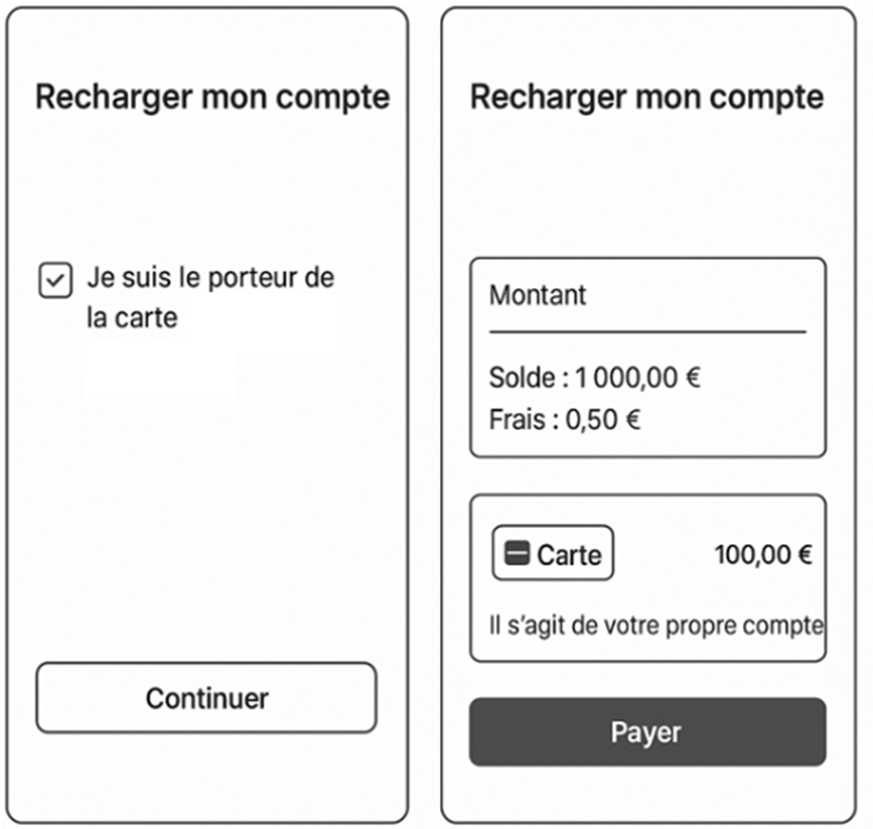
Me to Me
- Ask the enduser to the top-up is processed with its personal card
- In this case, you will complete the payer data in the POST request with the data from your database.
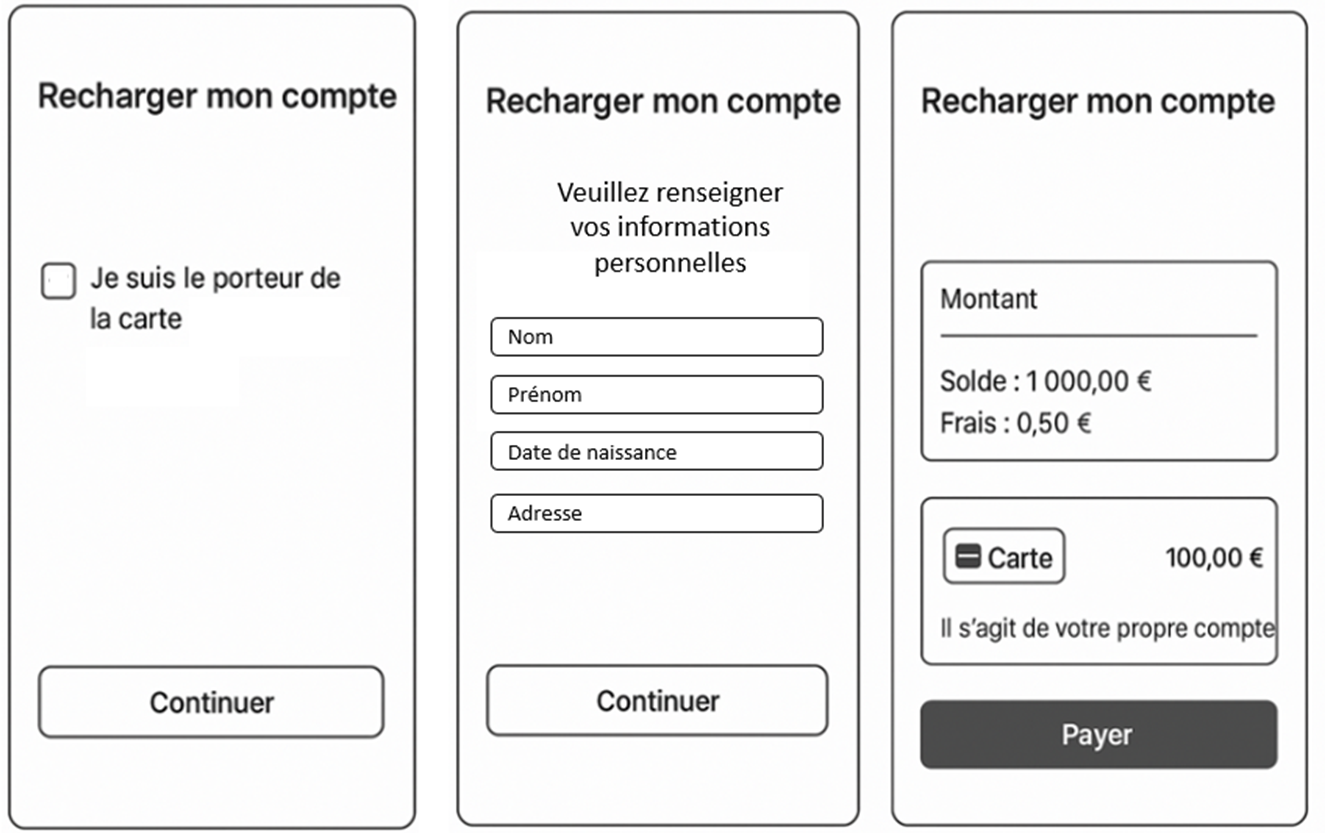
Person to Person
- The enduser confirms the card is owned by someone else.
- In this case, display fields needed to collect all data
- Add these data in the POST request
API details
`{
  "payer": {
    "firstName": "string", // string(1-15)     Required
    "lastName": "string", // string(1-15)    Required
    "address": {
      “street“: "110 avenue de France", // Required
      "city": "Paris",   // Required
      "zipCode": "75013",  // Required
      "country": "FR"  // Required
  	},
    "birthDate": "YYYY-MM-DD",// date au format YYYY-MM-DD    , Required
	...
  },
3DS top-up with / without card registration
If the user wants to save the card information, the attribute Card is not null. In this case, for the next top-up:
- the user will not have to fill in the card information
- the user will still need to validate the 3DS
Case 1: without card registration
POST /api/v1.1/payins/cardpayments
- the
AppCardIdis not filled
{
"OrderId": "{{orderId_TOPUP_1}}",
"UrlReturn": "http://rest-integ.s-money.net/HostedFieldsApp/v2/ProcessTopUp",
"Payer": {
"Name": "Jean DUPONT",
"Email": "[email protected]",
"UserAgent": "Mozilla/5.0 CK={} (Windows NT 6.1; WOW64; Trident/7.0; rv:11.0) like Gecko",
"UrlReferrer": "https://www.s-money.fr?cart=473",
"IpAddress": "127.0.0.1"
},
"Card": {
"HFToken":"{{HFToken}}",
"SelectedBrand":"{{selectedBrand}}"
},
"subscriptionTopUp": false,
"TermsAndConditionsValidationDate": "2022-05-17T17:00:48.0255806+01:00",
"Payments": [
{
"OrderId": "payment_{{orderId_TOPUP_1}}",
"Amount": 100, //cents
"Fee": 0, // cents
"Beneficiary": {
"AppAccountId": "{{accountId}}"
}
}
]
}Case 2: with card registration Same request, with the AppCardId filled.
POST /api/v1.1/payins/cardpayments
{
   [...]
   "Card": {
		"HFToken": "xxx",
		"AppCardId": "CB_Test",
		"SelectedBrand":"{{selectedBrand}}"
    },
   [...]
}Registration is only permitted if the account is funded with funds from the same person. If the funds come from a third party, the card cannot be registered.
One-click payment (with 3DS validation)
The card must already be registered.
To create a top up oneclick, you must, in the body of the request, add and fill in the AppCardId parameter instead of the HFToken parameter. This will allow you to directly call the previously registered bank card.
POST /api/v1.1/payins/cardpayments
{
   [...]
   "Card": {
        "AppCardId": "CB_Test",
    },
     "subscriptionTopUp": false
   [...]

    }
With subscription (one-click without 3DS validation)
The card must already be registered.
1st request
AppCardIdandHFToken- 3DS validation
POST /api/v1.1/payins/cardpayments
{
   [...]
   "card": {
            "HFToken": "xxx"
            "AppCardId": "CB_Test",
    },
     [...]
          "Payments": [
        {
             [...]
            "Beneficiary": {
                "AppAccountId": "{{accountId}}"
            }
	}
]
 [...]
}
Next request
- no
HFToken, only theAppCardId- no 3DS validation
-
the
Payments.Beneficiary.AppAccountIdmust be the same as then one used for the first requestPOST /api/v1.1/payins/cardpayments
-
- no 3DS validation
Top-up life cycle
| Etape | Definition | Response | |
|---|---|---|---|
| 1 | Creation of the authorisation at Xpollens side | Prerequesite: - request is correct. - Xpollens controls are OK. | post/v1.1/payins/cardpayments -> Response 200 |
| 2 | 3DS authentication | If KO, callback 1 {status 3} | |
| 3 | Creation of the authorisation on the Payplug side. | If OK, callback 1 {status: 1}. If KO, callback 1 {status: 3} |
stateDiagram
state fork_state <<fork>>
state fork_state2 <<fork>>
[*] --> post/v1.1/payins/cardpayments
post/v1.1/payins/cardpayments   --> fork_state
fork_state --> HTTP/200 : Created
fork_state --> HTTP/400: Not created
HTTP/200 --> fork_state2 : top-up status approved
fork_state2 --> Completed : 3DS completed <br/> Callback 1 status 1
fork_state2 --> Rejected: 3DS failed <br/> Callback 1 status 3
Completed --> [*]
Rejected --> [*]
HTTP/400 --> [*]
ExecCode: Execution Code
The ExecCode translates the status of the CB loading at the PayPlug level and the 3DS validation.
The GET v1.1/users/appUserId/payins/cardpayments/orderId retrieves details.
The execution codes are organized with different ranges:
- 0XXX operation succeeded or still processing
- 4XXX operation rejected because of the bank or the supplier
- 5XXX operation rejected because of a system error
- 6XXX operation rejected because of anti-fraud engine
| CODE | Message | Top-up status |
|---|---|---|
| 0000 | Successful operation | 1 |
| 0001 | 3-D Secure authentication required | 0 |
| 4001 | Transaction declined by the banking network | 3 |
| 4002 | Insufficient funds | 3 |
| 4003 | Card declined by the banking network | 3 |
| 4004 | The transaction has been abandoned | 3 |
| 4005 | Fraud suspicion | 3 |
| 4009 | 3DSecure authentication abandoned or expired | 3 |
| 4010 | Invalid transaction | 3 |
| 4011 | Duplicated transaction | 3 |
| 4012 | Invalid card data | 3 |
| 4013 | Transaction not allowed by banking network for this holder | 3 |
| 4014 | Non 3-D Secure-enrolled card | 3 |
| 4015 | Expired transaction | 3 |
| 4016 | Transaction declined by the payment terminal | 3 |
| 4017 | Form expiration (as planed by the merchant) | 3 |
| 4018 | Recurring payment revocated for this card holder | 3 |
| 4019 | The bank will decline further transactions from this card | 3 |
| 4020 | Strong customer authentication required by issuer | 3 |
| 4021 | Operation not allowed / not supported | 3 |
| 5001 | Exchange protocol failure | 3 |
| 5002 | Banking network error | 3 |
| 5003 | System under maintenance, please try again later | 3 |
| 5004 | Time out, the response will be sent to the notification URL (only applicable for Visa / MasterCard direct connection) | 3 |
| 5005 | 3-D Secure authentication error | 3 |
| 5006 | Unexpected bank response | 3 |
| 6001 | Transaction declined by the merchant | 3 |
| 6002 | Transaction declined | 3 |
| 6003 | The cardholder has already disputed a transaction | 3 |
| 6004 | Transaction declined by merchant and/or platform rules | 3 |
| 6005 | Card not enrolled or 3-D secure unavailable | 3 |
| 6006 | Blocked payment method | 3 |
| 6007 | Operation prohibited by the bank networks | 3 |
| 6008 | Card holder has already declared transaction as fraudulent | 3 |
API, callbacks and technical items
Callbacks
Callback1 : 🔗 Callback1 Callback5 : 🔗Callback5
Create a top-up
- TermsAndConditionsValidationDate: date/time UTC+3
- Date: date/time UTC+2
| Name | Type | Required | Restrictions | Description |
|---|---|---|---|---|
| Message | string | false | Obsolete | |
| OrderId | string | true | transaction Id | |
| UrlReturn | string | false | [^a-zA-Z0-9-_;.@= ] | URL to redirect your enduser after the top-up |
| Status | integer | false | Obsolete, don't use | |
| TermsAndConditions ValidationDate | date-time | true | yyyy-mm-ddT1hh:mm:ss.xxxxxxx | Top-up date |
| Payer.name | string | true | First Name & Last name of the payer | |
| Payer.email | string | true | Obsolete, use your enduser's email address | |
| Payer.userAgent | string | true | Obsolete, use " partnerName Browser" | |
| Payer.urlReferrer | string | true | Obsolete, use your website address | |
| Payer.ipAddress | string | true | Ip address of the user (ipv4 or v6) | |
| Card.HfToken | string | false - depending of the use case | Hf token previously created | |
| Card.AppCardId | string | false - depending of the use case | Existing card | Token of the card used for the top-up |
| Card.SelectedBrand | string | true | Value returned in the HFTOKEN | Card brand used for the top-up |
| Card.Status | integer | false | Obsolete | |
| Card.Hint | Obsolete | false | Obsolete | |
| Card.ExpiryDate | string | false | Obsolete | |
| Card.IsActive | string | false | Obsolete | |
| Payments.OrderId | string | true | Obsolete, use payment_orderId | |
| Payments.Amount | string | true | Amount in cents | |
| Payments.Fee | string | false | Obsolete, use the P2P post to debit fees | |
| Payments. Beneficiary.AppAccountId | string | true | Existing account for the appUserId | appAccountId to credit |
| Payments.Message | string | false | Obsolete | |
| Payments.Statut | string | false | Obsolete | |
| SubscriptionTopUp | string | false | true/false | Subscription for a topup |
Erros Code: response 400
| Name | Type |
|---|---|
| When Hftoken is not filled | {"Code": 354, "ErrorMessage": "Erreur module de rechargement", "Title": "", "Priority": 2} |
| When card is already registrered | { "Code": 717, "ErrorMessage": "CardId déjà existant.", "Title": "L'opération ne peut pas aboutir", "Priority": 2} |
| When OrderId already exists | { "Code": 710, "ErrorMessage": "OrderId déjà existant.", "Title": "L'opération ne peut pas aboutir", "Priority": 2} |
| When the card is not found | { "Code": 195, "ErrorMessage": "Carte de crédit introuvable", "Title": "L'opération ne peut pas aboutir", "Priority": 2} |
| When Payer name is not filled | { "Code": 177, "ErrorMessage": "Valeur de paramètre invalide ('Name' ne doit pas être vide.)", "Title": "L'opération ne peut pas aboutir", "Priority": 2} |
| When Amount is not filled | { "Code": 178, "ErrorMessage": "Les paramètres suivants sont invalides : cardPaymentRequestDto.Payments[0].Amount.", "Title": "L'opération ne peut pas aboutir", "Priority": 2} |
| When AppAcountId is not filled | { "Code": 149, "ErrorMessage": "Plafond de transaction atteint", "Title": "Opération non autorisée" } |
| When the appCardId is not registered for the accountId (error 404) | { "Code": 195, "ErrorMessage": "Carte de crédit introuvable", "Title": "L'opération ne peut pas aboutir"} |
Get a Top-Up
By orderid
- date: date/time UTC+2
- Response code 200
| Name | Type | To use | Value | Description |
|---|---|---|---|---|
| Message | string | Yes | Obsolete | |
| OrderId | string | Yes | transaction Id | |
| UrlReturn | string | Yes | URL to redirect your enduser after the top-up | |
| Status | integer | Yes | Obsolete, don't use | |
| Payer.name | string | Yes | First Name & Last name of the payer | |
| Payer.email | string | Yes | Obsolete | |
| Payer.userAgent | string | Yes | Obsolete | |
| Payer.urlReferrer | string | Yes | Obsolete | |
| Payer.ipAddress | string | Yes | Enduser Ip address | |
| Card.AppCardId | string | Yes | Given name to the used card | Token of the card used for the top-up |
| Card.Status | integer | no | 0 | Obsolete |
| Card.Hint | Obsolete | no | Obsolete | |
| Card.ExpiryDate | string | no | Obsolete | |
| Card.IsActive | string | no | Obsolete | |
| SelectedBrand | string | Yes | CB / MASTERCARD/ VISA | Card brand used for the top-up |
| Payments.OrderId | string | no | Obsolete, use orderId | |
| Payments.Amount | string | Yes | Amount of the top-up | |
| Payments.Fee | string | no | 0.0 | Obsolete, use the P2P post to debit fees |
| Payments. Beneficiary.AppAccountId | string | Yes | Existing account for the appUserId | appAccountId to credit |
| Payments.Message | string | no | null | Obsolete |
| Payments.Statut | string | no | 0 | Obsolete |
| ExtraResult.TransactionId | string | no | Obsolete | |
| ExtraResult.ExecCode | string | Yes | excution code on Payplug side | |
| ExtraResult.Message | string | Yes | Translation of the ExecCode | |
| ExtraResult.Currency | string | no | null | Obsolete |
| ExtraResult.ThreeDSecure | string | no | null | Obsolete |
| ExtraResult.ThreeDSAuthenticationStatus | string | no | null | Obsolete |
| extraResult.AuthorizationNumber | string | no | null | Obsolete |
| extraResult.CardNetwork | string | no | null | Obsolete |
| extraResult.CardValidityDate | string | no | null | Obsolete |
| extraResult.CardCountry | string | no | null | Obsolete |
| extraResult.CardFullname | string | no | null | Obsolete |
| extraResult.CardThreeDSecureEnrolled | string | no | null | Obsolete |
| extraResult.ThreeDSecureVersion | string | no | 0 | Obsolete |
| extraResult.ThreeDSGlobalStatus | string | no | null | Obsolete |
| extraResult.Version | string | no | null | Obsolete |
| extraResult.CardType | string | no | null | Obsolete |
| TermsAndConditions ValidationDate | date-time | Yes | yyyy-mm-ddThh:mm:ss.xxxxxxx | Same value than the post |
| Date | date-time | Yes | true/false | UTC (FR) |
| refunds | string | false | Details of the refund |
Get All top-up
IMPORTANTWhen The
GET /api/v1.1/users/USERID/payins/cardpaymentsAPI is called without additional parameters (startDate,endDate)it will return the user top-ups starting 30 days before the current date until the current date. The maximum timeframe betweenstartDateandendDateis 31 days
If the timeframe exceeds 31 days then an exception (http/400) will be raised by the API.
{
  "code": 1,
  "errorMessage": "Unknown technical error, please contact Xpollens support. Max date range allowed is 31 days.",
  "title": "Technical error",
  "priority": 2,
  "date": "2024-06-17T15:04:39.3684193Z",
  "operationId": "f7903cd3b34ef856bfdf493d4ad65f9f",
  "httpStatusCode": 400
}
Refund a Top-Up
Top-Up reimbursement may be total or partial.This reimbursement allows you to return to the original situation in terms of creditlimit, as if the initial operation had not taken place.
Post refund
- where orderId = orderId of the original transaction
- and paymentId = paymentId of the original transaction
| Name | Type | Required | Restriction | Description |
|---|---|---|---|---|
| id | string | Obsolete | Obsolete | Obsolete |
| amount | string | Mandatory |
| Amount of the refund |
| fee | string | Obsolete | Obsolete | Obsolete |
| orderId | string | Mandatory | Unique orderId | Your orderId for the refund |
| status | string | Obsolete | Obsolete |
If the cancellation is made on the same day, before the merchant discount, then there is only one transaction, with the status Refund.In the opposite case, two operations will exist: the original operation with Completed status, and the Refund operation with status Completed and Rtransaction = true
Response
Response
| Name | Type | To use | Value | Description |
|---|---|---|---|---|
| Id | string | no | Obsolete | Xpollens internal transaction id |
| OrderId | string | Yes | transaction orderId | |
| Amount | string | Yes | XX.XX | Amount € |
| Fee | string | no | Obsolete | Obsolete |
| Status | string | Yes | 1 | refund status completed |
| PaymentDate | string | Yes | UTC+3 | date of the refund |
| OriginalPayment.Id | string | no | Obsolete | Obsolete |
| OriginalPayment.OrderId | string | Yes | initial top-up | |
| OriginalPayment.Href | string | no | Obsolete | Obsolete |
| Type | string | no | 1 | Obsolete |
Error codes
| Name | Type |
|---|---|
| Insufficient balance | { "Code": 110, "ErrorMessage": "Votre solde est insuffisant pour effectuer ce virement. Veuillez saisir un autre montant.", "Title": "Opération non autorisée", "Priority": 2, "Date": "2024-04-25T09:39:57.3326109Z", "OperationId": "2cb1cd79829d041fe2fd0c4c5274ce03"} |
| Status of the top-up is not "Completed" | { "Code": 364, "ErrorMessage": "Opération invalide", "Title": "L'opération ne peut pas aboutir", "Priority": 2, "Date": "2024-04-25T09:46:57.8817933Z", "OperationId": "7b2e38c3ac31db9d1256aea67f7b7b7f"} |
| Refund orderId already exists | { "Code": 364, "ErrorMessage": "Opération invalide", "Title": "L'opération ne peut pas aboutir", "Priority": 2, "Date": "2024-04-25T09:46:57.8817933Z", "OperationId": "7b2e38c3ac31db9d1256aea67f7b7b7f"} |
| Refund amount = 0 | { "Code": 704, "ErrorMessage": "Paramètre(s) d'appel manquant(s) ({0}). amount is invalid", "Title": "L'opération ne peut pas aboutir", "Priority": 2, "Date": "2024-05-15T13:50:27.452768Z", "OperationId": "bcb194d1af237f8bab8c1697c41bf67c"} |
| Sum of refunds > initial transaction amount | { "Code": 706, "ErrorMessage": "Le montant du remboursement dépasse le montant de l'opération originale.", "Title": "L'opération ne peut pas aboutir", "Priority": 2, "Date": "2024-05-15T13:48:34.9307117Z", "OperationId": "74204d2cabbcdac8293458f5a0a07404"} |
| Top-up already refunds through Payplug BackOffice | { "Code": 707, "ErrorMessage": "{0}", "Title": "L'opération ne peut pas aboutir", "Priority": 2, "Date": "2024-05-07T15:26:20.9242088Z", "OperationId": "1ff1458942d8c1f1914cfe27640abf4e"} |
| Transaction already refunded totally | { "Code": 708, "ErrorMessage": "Statut du paiement incohérent", "Title": "L'opération ne peut pas aboutir", "Priority": 2, "Date": "2024-04-25T09:43:53.2930334Z", "OperationId": "57591d396a793b2156053840cec15ee8"} |
How to test
Sandbox
1- Get a HF TOKEN
On test environments, you can either use the integrated payment HTML page provided by Dalenys or use the following API to get an HFToken
POST https://secure-test.be2bill.com/hosted-fields/service/tokenizewith the following parameters (x-www-form-urlencoded) :
CARDCODE=4464215790990001
CARDVALIDITYDATE=06/24
CARDCVV=123
SELECTEDBRAND=visa
APIKEYID=<provided on demand>
cUrl example
curl -X POST -k -H 'Content-Type: application/x-www-form-urlencoded' \
-i 'https://secure-test.be2bill.com/hosted-fields/service/tokenize' \
--data 'CARDCODE=4464215790990001&CARDVALIDITYDATE=06/24&CARDCVV=123&SELECTEDBRAND=visa&APIKEYID=<PROVIDED ON DEMAND>'
Response code
{
    "EXECCODE": "0000",
    "MESSAGE": "Operation succeeded.",
    "HFTOKEN": "7016e7df-04ef-4c92-83e2-8c5d1155c2b6",
    "CARDTYPE": "VISA",
    "CARDVALIDITYDATE": "06-24",
    "CARDCODE": "446421XXXXXX0001",
    "SELECTEDBRAND": "visa",
    "BINTYPE": "Consumer",
    "BINBRANDS": [
        {
            "BRAND": "VISA",
            "SERVICETYPE": "Debit"
        }
    ],
    "BINNETWORK": "VISA"
}
2- Create a top_up with
POST /v1.1/payins/cardpayments
{
"OrderId": "{{orderId_TOPUP_1}}",
"UrlReturn": "http://rest-integ.s-money.net/HostedFieldsApp/v2/ProcessTopUp",
"Payer": {
"Name": "Jean DUPONT",
"Email": "[email protected]",
"UserAgent": "Mozilla/5.0 CK={} (Windows NT 6.1; WOW64; Trident/7.0; rv:11.0) like Gecko",
"UrlReferrer": "https://www.s-money.fr?cart=473",
"IpAddress": "127.0.0.1"
},
"subscriptionTopUp": false,
"Card": {
"HFToken":"{{HFTOKEN}}",
"AppCardId": "CB_{{orderId_TOPUP_1}}",
"SelectedBrand": "VISA"
},
"TermsAndConditionsValidationDate": "2022-05-17T17:00:48.0255806+01:00",
"Payments": [
{
"OrderId": "payment_{{orderId_TOPUP_1}}",
"Amount": 100, //cents
"Fee": 0, // cents
"Beneficiary": {
"AppAccountId": "{{accountId}}"
}
}
]
}3- Validate 3DS
- On postman, click on visualize > Inspect vizualisation > copy link address
- Paste it in your browser.
- Validate 3DS.
4- Create a refund
POST /V1.1/users/accountId/payins/cardpayments/orderId_TOPUP_1/payments/payment_orderId_TOPUP_1/refunds
{
        "orderid" : "orderId_refund",
        "amount" : {amount} //cents
}
Production
When the alphatests are launched, the Payplug library and url configurations need to be modified. Ask your Customer Integration Manager.
FAQ
Can I access to the Payplug backoffice?
No, you don't have access. Only xpollens employees have access.
After a top-up, how to redirect my enduser from the 3DS page to the application.
You need to fill the UrlReturn in the post.
Can I customise the 3DS page?
No, you can only modify the logo and the merchant name.
I can't find my top-ups
The GET /api/v1.1/users/userid/payins/cardpayments has some limitations regarding the timeframe and the maximum number of records it can return.
Please see the note here for more detailed information : 🔗 Get All top-ups
Can we have Top-Up without 3DS Yes,
- if the subscription mode is used
- for B2B cards
Updated 6 months ago