

FATCA / CRS
FATCA / CRS
Financial institutions are required to collect and assess information about their customers' tax residences and, where applicable, report relevant financial account information to the competent tax authorities.
The Xpollens FATCA/CRS feature supports this process by:
- collecting the customer's tax-residency information;
- checking the consistency of the declaration against information already known about the customer;
- requesting supporting documents when required;
- generating a FATCA/CRS self-certification;
- allowing the customer to review, sign, reject or later revoke the self-certification;
- notifying the partner of lifecycle changes through callbacks;
- requesting a new self-certification when the existing one becomes obsolete or expires.
The FATCA/CRS process contains three related but independent lifecycles:
- the overall FATCA/CRS declaration;
- each self-certification;
- the supporting attachments associated with a self-certification.
Terminology
This guide uses FATCA/CRS for the overall process. Some existing technical fields and historical documentation use FATCA/EAI. EAI means Échange automatique d'informations and is used here as an implementation term related to CRS.
Definitions
FATCA
FATCA stands for Foreign Account Tax Compliance Act. It is a United States tax-compliance framework intended to identify and report financial accounts held outside the United States by certain US persons.
CRS / EAI
CRS stands for Common Reporting Standard. It is the OECD standard under which participating jurisdictions collect information from financial institutions and automatically exchange financial account information with other participating jurisdictions.
In French documentation, this mechanism is also referred to as EAI (Échange automatique d'informations).
https://www.oecd.org/tax/automaticexchange.htm
TIN
A TIN (Tax Identification Number) is the tax identifier issued by a jurisdiction to a taxpayer.
TIN requirements and formats depend on:
- the tax country;
- the customer type;
- the current version of the Xpollens TIN referential.
The TIN rules must therefore not be hard-coded from this functional guide. Partners should consume the dedicated TIN-format APIs described in TIN formats and referential.
Tax-information consistency check
The consistency check compares the customer's tax declaration with information already known about the customer, such as:
- country of birth;
- nationality;
- country of residence;
- declared tax-residence countries;
- US-person declaration;
- tax identification numbers.
This control is sometimes referred to as vraisemblance.
The consistency check is distinct from document review. Supporting documents may require analysis by the Xpollens Middle Office team.
Scope and prerequisites
The current v4 API describes FATCA/CRS declarations for:
- individuals only
FATCA/CRS API does not apply to
- legal entities;
- mandated persons;
- legal representatives;
- beneficial owners.
The FATCA steps for legal entities, individual entrepreneurs, .. will be handled by Ondorse.
Before starting the process:
- the user must have been created;
- the required identity and KYC information must be available;
- the customer's wallet must be initialized when Strong Customer Authentication is required by the configured journey;
- the partner must be able to receive FATCA/CRS callbacks;
- the partner logo used in the self-certification PDF must be configured;
- the partner should have loaded the current TIN referential.
FATCA/CRS steps (Overview)
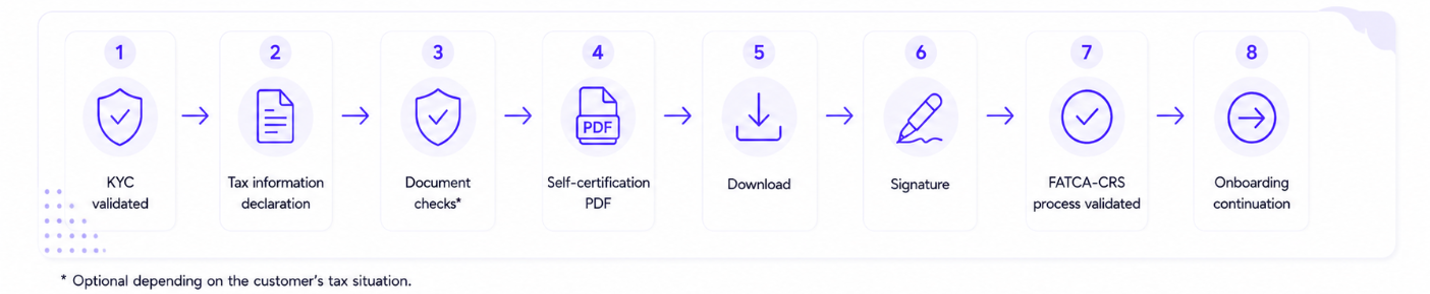
FATCA/CRS lifecyle
graph TD

classDef action fill:#2f3942,stroke:#aab8c5,stroke-width:1px,stroke-dasharray:5 5,color:#ffffff
classDef status fill:#594300,stroke:#d9a900,stroke-width:1.5px,stroke-dasharray:5 5,color:#ffffff
classDef process fill:#263b4a,stroke:#6f9fbd,stroke-width:1px,color:#ffffff
classDef error fill:#4b2929,stroke:#c96868,stroke-width:1px,color:#ffffff
classDef success fill:#304a35,stroke:#6fa778,stroke-width:1px,color:#ffffff


%% =========================================================
%% INITIAL JOURNEY
%% =========================================================

A["User fills in<br>FATCA/CRS information"]

B["PATCH FATCA-CRS"]

C["Validate request<br><br>Mandatory information<br>US person / tax country consistency<br>TIN mandatory rules<br>TIN format"]

D["AwaitingInitialValidation"]

E["Initial self-certification<br>lifecycle"]

V["Validated"]

ON["Onboarding<br>unblocked"]


A --> B
B --> C
C -->|Request accepted| D
D --> E
E -->|Self-certification validated| V
V --> ON


%% =========================================================
%% API ERRORS
%% =========================================================

subgraph API_errors

    X["400 - Request rejected<br><br>Mandatory information missing<br>US person / tax country inconsistency<br>TIN declaration mandatory<br>TIN format invalid<br>Invalid request"]

    Y["422 - Invalid operation<br>for current status"]

end


C -->|Invalid request| X
X -->|Correct data and resubmit| A

B -->|Operation not allowed<br>in current status| Y


%% =========================================================
%% REVALIDATION TRIGGERS
%% =========================================================

R["RevalidationRequested<br><br>Reason:<br>SelfCertificationExpired<br>SelfCertificationRevokedByCustomer<br>CustomerInformationChanged"]


V -->|Self-certification expires| R

V -->|Relevant customer information changes| R


%% =========================================================
%% USER-INITIATED TAX INFORMATION UPDATE
%% =========================================================

U["Customer wants to update<br>FATCA/CRS information"]

REV["Revoke current valid<br>self-certification"]


V --> U
U --> REV
REV --> R


%% =========================================================
%% REVALIDATION JOURNEY
%% =========================================================

P["PATCH FATCA-CRS<br>Start replacement declaration"]

AR["AwaitingRevalidation"]

RS["Replacement self-certification<br>lifecycle"]

RV["Validated again"]

NC["NonCompliant"]

CA["Compliance action<br>according to product / partner policy"]


R --> P
P --> AR
AR --> RS

RS -->|Replacement self-certification validated| RV

RV -.-> V


%% =========================================================
%% REVALIDATION FAILURE
%% =========================================================

R -->|Remediation deadline reached| NC
AR -->|Remediation deadline reached| NC

NC --> CA


%% =========================================================
%% STYLES
%% =========================================================

class A,ON,U,REV,P,CA action
class B,C,E,RS process
class D,R,AR,NC status
class V,RV success
class X,Y error
Signature refusalIf the user refuse to sign the self certificate declaration then he will have to restart the FATCA/CRS declaration from step 0
FATCA/CRS sequence diagram (Detailed)
The diagram distinguishes:
- synchronous API responses, returned directly to the caller;
- asynchronous callbacks, emitted later when a FATCA/CRS resource changes.
sequenceDiagram
autonumber

actor User
participant Partner
participant XPO as Xpollens

rect rgb(245, 245, 245)
Note over User,XPO: Prerequisites
Note over User,XPO: User created
Note over User,XPO: KYC information available
Note over User,XPO: Wallet initialized when required for SCA
Note over Partner,XPO: FATCA/CRS callbacks configured
end

rect rgb(235, 245, 255)
Note over User,XPO: 1. Collect and submit the FATCA/CRS declaration

Partner-->>User: Display FATCA/CRS questionnaire
User->>Partner: Submit isUSPerson and taxInformation

Partner->>XPO: PATCH /api/v4.0/users/{appUserId}/fatca-crs<br/>or configured SCA-protected equivalent

XPO-->>Partner: Synchronous HTTP response<br/>global FATCA/CRS status<br/>selfCertifications summary<br/>requiredAttachments when applicable

Note over Partner,XPO: The synchronous response gives the state produced by this request
end

rect rgb(255, 248, 230)
Note over User,XPO: 2. Receive asynchronous lifecycle notifications

par Global FATCA/CRS resource changes
XPO-->>Partner: Callback FatcaCrsCreatedOrUpdated<br/>global status and remediation information
and Self-certification resource changes
XPO-->>Partner: Callback FatcaCrsSelfCertificationCreatedOrUpdated<br/>self-certification status<br/>requiredAttachments
end

Note over Partner,XPO: Callbacks notify subsequent or asynchronous state changes
end

rect rgb(255, 250, 225)
Note over User,XPO: 3. Provide supporting attachments when required

alt requiredAttachments is empty
Note over Partner,XPO: Self-certification can continue toward PDF generation
else One or more attachments are required
Partner-->>User: Display required attachment types
User->>Partner: Provide requested document

Partner->>XPO: POST /api/v3.0/users/{appUserId}/fatca/attachments
XPO-->>Partner: Synchronous HTTP 201<br/>created diligence and file key

XPO-->>Partner: Callback FatcaCrsAttachmentCreatedOrUpdated<br/>attachment status: Received / UnderReview / Validated / Rejected

opt Self-certification state changes after attachment processing
XPO-->>Partner: Callback FatcaCrsSelfCertificationCreatedOrUpdated<br/>UnderAttachmentReview or next lifecycle status
end

opt Global FATCA/CRS state changes
XPO-->>Partner: Callback FatcaCrsCreatedOrUpdated<br/>updated global status
end
end
end

rect rgb(240, 255, 240)
Note over User,XPO: 4. Generate and review the self-certification

XPO-->>Partner: Callback FatcaCrsSelfCertificationCreatedOrUpdated<br/>status: UnderPdfGeneration
XPO-->>Partner: Callback FatcaCrsSelfCertificationCreatedOrUpdated<br/>status: AwaitingDownload

Partner->>XPO: GET /api/v4.0/users/{appUserId}/fatca-crs-self-certification/{selfCertificationId}/download
XPO-->>Partner: Synchronous HTTP 200<br/>unsigned PDF
Partner-->>User: Display PDF for review

Note over Partner,XPO: The download changes the status to AwaitingSignature
XPO-->>Partner: Callback FatcaCrsSelfCertificationCreatedOrUpdated<br/>status: AwaitingSignature
end

rect rgb(250, 240, 255)
Note over User,XPO: 5. Sign or reject the self-certification

alt Customer accepts the content
Partner->>XPO: POST /api/sca/v4.0/users/{appUserId}/fatca-crs-self-certification/{selfCertificationId}/sign
XPO-->>Partner: Synchronous HTTP 200<br/>status: UnderSignedPdfGeneration

XPO-->>Partner: Callback FatcaCrsSelfCertificationCreatedOrUpdated<br/>status: UnderSignedPdfGeneration
XPO-->>Partner: Callback FatcaCrsSelfCertificationCreatedOrUpdated<br/>status: Validated
XPO-->>Partner: Callback FatcaCrsCreatedOrUpdated<br/>global status: Validated
else Customer rejects the content
Partner->>XPO: POST /api/v4.0/users/{appUserId}/fatca-crs-self-certification/{selfCertificationId}/reject
XPO-->>Partner: Synchronous HTTP 200<br/>status: Rejected
XPO-->>Partner: Callback FatcaCrsSelfCertificationCreatedOrUpdated<br/>status: Rejected
end
end

rect rgb(235, 255, 235)
Note over User,XPO: 6. Maintain compliance

opt Certification expires, is revoked, or customer information changes
XPO-->>Partner: Callback FatcaCrsCreatedOrUpdated<br/>status: RevalidationRequested<br/>remediation reason and deadline
XPO-->>Partner: Callback FatcaCrsSelfCertificationCreatedOrUpdated<br/>status: Expired or Revoked
Note over User,XPO: A replacement self-certification must be completed before the deadline
end
end
Synchronous response versus callbacks
The PATCH /fatca-crs response and the callbacks serve different purposes.
| Mechanism | Timing | Purpose |
|---|---|---|
| Synchronous PATCH response | Returned immediately as the HTTP response to the partner's request | Confirms that the declaration was created or updated and returns the state resulting from the request, including the global status, recent self-certifications and any requiredAttachments exposed in the response |
FatcaCrsCreatedOrUpdated | Asynchronous | Notifies a change to the global FATCA/CRS resource, including validation, revalidation and remediation lifecycle changes |
FatcaCrsSelfCertificationCreatedOrUpdated | Asynchronous | Notifies a change to a specific self-certification and can expose its current status and requiredAttachments |
FatcaCrsAttachmentCreatedOrUpdated | Asynchronous | Notifies creation or review-status changes for the attachments linked to a self-certification |
The partner may therefore learn that an attachment is required:
- directly from the synchronous PATCH response;
- from a subsequent
FatcaCrsSelfCertificationCreatedOrUpdatedcallback; - by retrieving the latest self-certification details through the GET API.
The partner should treat the API response as the immediate result of the submitted request and the callbacks as notifications of subsequent resource changes. The latest GET response remains the source of truth when reconciliation is necessary.
Process overview
| Phase | Partner responsibility | Xpollens responsibility |
|---|---|---|
| Collect declaration | Display the questionnaire and collect isUSPerson and taxInformation | Provide validation rules and TIN referential |
| Submit declaration | Call the FATCA/CRS PATCH endpoint and handle the configured SCA journey | Create or update the declaration and determine required attachments |
| Process attachments | Display requested document types and upload the documents | Receive and review attachments, then update their statuses |
| Review certification | Download and display the generated PDF | Generate the unsigned self-certification |
| Sign or reject | Let the customer accept/sign or reject the content | Apply the requested transition and generate the signed PDF |
| Maintain compliance | React to expiration, revocation or information changes | Request revalidation and publish the remediation deadline |
Collect customer tax information
The partner must collect:
isUSPerson;- one to three entries in
taxInformation; taxCountryfor each tax residence;taxIdentificationNumberwhen required by the current TIN referential.
TIN format and mandatory-field checks
At this stage, the partner should perform basic checks before submitting the FATCA/CRS declaration:
- verify that all mandatory fields are present;
- determine whether a TIN is mandatory for each declared tax country and customer type;
- validate each supplied TIN against the format defined for the corresponding tax country;
- display the expected format or a user-friendly description when the value is invalid.
For every TIN supplied by the customer, the format must be checked against the tax country associated with it. Depending on the country, the expected format may contain a specific combination of digits, letters and other characters.
The TIN is optional when:
- the tax country is
FR; - the tax country belongs to the list of jurisdictions for which a TIN is optional;
- the tax country is not a CRS/EAI participating jurisdiction.
For all other cases, the TIN is mandatory.
The current implementation must derive this rule from the Xpollens TIN referential returned by:
GET /api/v3.0/tin-formatsThe partner must use:
isTINMandatoryto determine whether the field is required;acceptedFormatsandacceptedFormatsDescriptionto guide the customer;regularExpressionto validate the value before submitting the declaration.
The Xpollens referential is the operational source of truth and may evolve through contentVersion. The OECD country pages may be used as a complementary reference for tax-identification-number information:
OECD — Tax identification numbers
TIN referential
TIN requirements vary by country and customer type. Xpollens exposes a versioned referential so that partners can display the correct requirements and validate the input before calling the FATCA/CRS API.
Retrieve the current referential version
GET /api/v3.0/tin-formats/versionExample response:
{
  "description": "Version of the Tax Identification Number format and mandatory countries references for FATCA-CRS",
  "contentVersion": 2
}
The contentVersion increases whenever the referential changes.
The Swagger recommends:
- checking the version periodically, for example once a week;
- or subscribing to the
TinFormatsUpdatedcallback when it is available.
Retrieve all TIN rules
GET /api/v3.0/tin-formatsThe response contains:
{
  "description": "Tax Identification Number format references and mandatory countries for FATCA-CRS, categorized by country and user type",
  "contentVersion": 1,
  "values": [
    {
      "countryCode": "AD",
      "userTypes": {
        "individuals": {
          "isTINMandatory": true,
          "acceptedFormats": [
            "E######@",
            "F######@"
          ],
          "acceptedFormatsDescription": "E or F followed by 6 digits and a letter",
          "regularExpression": "^(E|F)\\d{6}[A-Z]$"
        },
        "legalEntities": {
          "isTINMandatory": false,
          "acceptedFormats": [],
          "acceptedFormatsDescription": "...",
          "regularExpression": "..."
        }
      }
    }
  ]
}
Meaning of the TIN-rule fields
| Field | Description |
|---|---|
countryCode | Country in ISO 3166-1 alpha-2 format |
userTypes.individuals | Rules applicable to individuals |
userTypes.legalEntities | Rules applicable to legal entities |
isTINMandatory | Indicates whether the TIN must be provided |
acceptedFormats | Human-readable examples using Xpollens placeholders |
acceptedFormatsDescription | Description to display to the user |
regularExpression | Regular expression that can be used for client-side validation |
contentVersion | Version of the complete referential |
The placeholder characters used in acceptedFormats are:
| Placeholder | Meaning |
|---|---|
@ | Any uppercase letter from A to Z |
# | Any digit from 0 to 9 |
* | Any uppercase alphanumeric character |
For individual entrepreneurs, the Swagger indicates that the individual TIN format should be used.
Recommended integration strategy
- Retrieve and cache the TIN referential.
- Store its
contentVersion. - Check
/tin-formats/versionperiodically or react toTinFormatsUpdated. - Refresh the full referential only when the version changes.
- Select the entry matching
taxCountry. - Use the rules for the relevant user type.
- Display
acceptedFormatsDescriptionto the customer. - Enforce
isTINMandatory. - Validate the value against
regularExpression. - Still handle server-side errors because the API remains the source of truth.
The historical documentation identifies France and certain other jurisdictions as cases where the TIN may be optional. The integration must nevertheless evaluate the current
isTINMandatoryvalue from the versioned Xpollens referential.
French overseas territories
The following country codes are accepted by the consistency rules.
| Territory | Accepted tax-country codes |
|---|---|
| Metropolitan France | FR |
| Guadeloupe | GP or FR |
| French Guiana | GF or FR |
| Martinique | MQ or FR |
| Réunion | RE or FR |
| Mayotte | YT or FR |
| Saint Martin | MF or FR |
| Saint Barthélemy | BL |
| New Caledonia | NC |
| French Southern and Antarctic Lands | TF |
| Wallis and Futuna | WF |
| French Polynesia | PF |
| Saint Pierre and Miquelon | PM |
These codes describe product consistency rules and do not constitute legal or tax advice about the customer's actual tax residence.
Submit or update FATCA/CRS information
PATCH /api/v4.0/users/{appUserId}/fatca-crsThe endpoint creates or updates the customer's FATCA/CRS information.
The documented request fields are:
| Field | Description |
|---|---|
isUSPerson | Indicates whether the customer is considered a US person according to the definition applied by Xpollens |
taxInformation | Up to three declared tax residences |
taxCountry | Tax-residence country in ISO 3166-1 alpha-2 format |
taxIdentificationNumber | TIN associated with the declared tax country |
A successful response may contain:
- the FATCA/CRS declaration identifier;
- the global FATCA/CRS status;
- lifecycle dates;
- remediation information;
- recent self-certifications;
- required attachments.
Example request:
{
  "isUSPerson": true,
  "taxInformation": [
    {
      "taxCountry": "FR",
      "taxIdentificationNumber": ""
    },
    {
      "taxCountry": "PT",
      "taxIdentificationNumber": "199999999"
    },
    {
      "taxCountry": "US",
      "taxIdentificationNumber": "999-99-9999"
    }
  ]
}
Potential validation errors from the FATCA/CRS PATCH endpoint include:
| Error code | Meaning |
|---|---|
MISSING_INFORMATION | Required information is missing |
US_PERSON_INCONSISTENCY | isUSPerson is inconsistent with the declared tax countries |
TIN_INVALID | The TIN is missing when required or does not match the current referential |
INVALID_OPERATION | The operation is not allowed in the current lifecycle state |
Updating information after validation
A customer with a valid signed self-certification cannot directly update the tax information.
The current sequence is:
- revoke the valid self-certification;
- call
PATCH /fatca-crsto start the new declaration; - complete any requested attachments;
- download and sign the new self-certification before the remediation deadline.
FATCA/CRS assessment
The assessment contains two complementary parts.
FATCA / CRS assessment
Xpollens determines whether supporting evidence is required for the customer's US-person declaration.
Possible attachment types are:
| Technical value | Purpose |
|---|---|
W9 | FATCA document for customers who are US tax residents |
W8-Ben | FATCA document for non-US customers who certify foreign status and beneficial-owner status |
OtherDocs | Additional evidence supporting the declared tax residence for CRS |
The exact attachment type must come from requiredAttachments. The partner should not infer it solely from the country of birth or country of residence.
FATCA / CRS consistency assessment
Xpollens checks whether the declared tax residences are consistent with the customer information already available.
Examples of potential inconsistencies include:
- the residence country is absent from the tax declaration;
- the customer declares a tax country that is not readily consistent with the residence information;
- US indicia are inconsistent with
isUSPerson; - a required TIN is missing;
- a TIN does not match the expected format.
Tax Information Consistency / Vraisemblance
The following original diagram should be retained because it helps explain when complementary documents may be required.
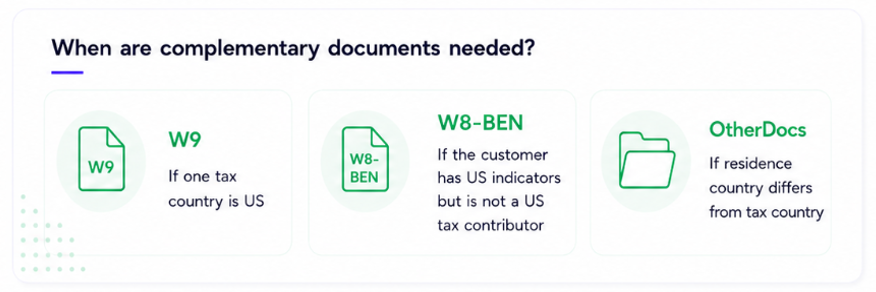
The exact API outcome and requiredAttachments returned by Xpollens take precedence over deductions made from this diagram.
Supporting attachments
When requiredAttachments is not empty, the partner must:
- display the exact requested attachment types;
- collect the corresponding documents;
- upload them through the attachment endpoint;
- process attachment callbacks;
- wait until all required attachments are validated;
- continue following the self-certification status.
Upload endpoint
Sandbox:
POST https://sb-api.xpollens.com/api/v3.0/users/{AppUserId}/fatca/attachmentsProduction uses the equivalent production API host.
Prerequisites
This endpoint is intended to be called when:
- the user must provide one of the requested supporting documents.
- As long as self-certification status is
AwaitingAttachmentUpload
Request format
The request body is JSON. The supported media types declared by the Swagger include:
application/json;application/json-patch+json;application/*+json;text/json.
The body follows this structure:
{
  "type": "23",
  "files": [
    {
      "name": "w8-ben.pdf",
      "content": "<base64-encoded file content>"
    }
  ]
}| Field | Required | Description |
|---|---|---|
type | Yes | FATCA diligence subtype identifier |
files | Yes | Files to upload |
files[].name | Yes | File name including its extension |
files[].content | Yes | File content encoded as Base64 |
FATCA diligence subtype referential
| ID | Code | Description |
|---|---|---|
22 | FATCA_W9 | W-9 form |
23 | FATCA_W8-BEN | W-8BEN form |
24 | FATCA-OTHER | Other personal FATCA/CRS supporting document |
38 | FATCA_CERTIFICATION_FORM | Signed FATCA self-certification document (v3 compatibility - Not used for v4) |
39 | FATCA_W8-BEN-E | W-8BEN-E, for legal entities only (v3 compatibility - Not used for v4) |
Supported file formats and size limits
The file name must include an extension.
Supported extensions are:
- JPEG;
- GIF;
- TIFF;
- PNG;
- BMP;
- ZIP;
- PDF.
The Swagger states the following maximum file sizes:
- 50 MB for a ZIP archive;
- 20 MB for any other file.
Number of files
The Swagger states that a diligence other than an identity diligence must not contain more than one document.
For FATCA/CRS, the safe integration rule is therefore:
- submit one file per diligence request;
- create separate upload requests when several supporting documents are required.
Success response
A successful upload returns HTTP 201 Created with a FatcaDiligenceDto, including:
type;status;- uploaded file references;
creationDate;lastUpdate.
Each returned file reference contains:
name;key.
The key can be used to retrieve the uploaded attachment.
Download an uploaded attachment
GET /api/v3.0/users/{AppUserId}/fatca/attachments/{Key}The response uses a DiligenceBlobDto containing:
fileName;contentType.
Documented errors
| HTTP status | Meaning |
|---|---|
400 | Invalid request, including more than one document for a non-identity diligence |
404 | User or attachment resource not found |
500 | Internal server error |
The broader diligence schemas also document validation cases such as:
- missing
type; - missing
files; - missing file
name; - missing file
content; - unknown diligence type;
- unsupported document type;
- diligence type not expected for the current demand.
Attachment lifecycle
The documented attachment statuses are:
| Status | Meaning |
|---|---|
Received | The attachment was received, but other KYC documents remain to be sent; documented as specific to individual entrepreneurs |
UnderReview | The attachment is being analysed |
Validated | The attachment was accepted |
Rejected | The attachment was rejected and must be sent again |
The attachment callback may also provide:
id;attachmentType;requestDate;uploadDate;decisionDate;rejectReason;lastUpdate;comments.
A technically successful upload does not mean that the document has been validated.
Other CRS supporting documents
For an OtherDocs request, the partner should ask the customer to provide evidence explaining the discrepancy.
Depending on the case, evidence may include:
- a tax assessment;
- a tax-residency certificate;
- proof of employment or assignment abroad;
- proof of studies or enrolment;
- another document requested by the Xpollens Middle Office team.
The partner should display the requested diligence and any rejection comments returned by Xpollens rather than promise a specific document in advance.
Other DocumentsOther documents are requested only in cases where there is an inconsistency between the country of residence and the country of tax residence.
(Mainly foreign students residing in France.)
Self-certification lifecycle
The self-certification lifecycle is distinct from the overall FATCA/CRS lifecycle.
Self-certification statuses
| Status | Meaning |
|---|---|
AwaitingAttachmentUpload | At least one supporting attachment must still be uploaded |
UnderAttachmentReview | The required attachments were submitted and are being reviewed |
UnderPdfGeneration | The unsigned self-certification PDF is being generated |
AwaitingDownload | The PDF is available and must be downloaded for customer verification |
AwaitingSignature | The PDF was downloaded and can now be signed |
UnderSignedPdfGeneration | The signature was accepted and the signed PDF is being generated |
Validated | The self-certification is signed and valid |
Rejected | The customer rejected the PDF content |
Aborted | The customer started another self-certification, aborting this one |
Revoked | The customer revoked a previously valid self-certification |
Expired | The self-certification expired and must be replaced |
Self-certification lifecycle
graph TD

classDef action fill:#d9ecfb,stroke:#1683c4,stroke-width:1px,color:#263746
classDef status fill:#fff5cc,stroke:#e4b72b,stroke-width:1px,color:#263746

A["User declares tax info"]

subgraph Complementary_documents
    B["Awaiting Attachment Upload"]
    C["User sends Attachment"]
    D["Under Attachment Review"]

    B --> C
    C --> D
    D -->|Document refused| B
end


subgraph Certification_zone

    subgraph FATCA_update
        R["User uses FATCA patch before signing"]
        S["Aborted - new SC is created"]

        R --> S
    end


    subgraph Self_certification
        E["UnderPdfGeneration"]
        F["AwaitingDownload"]
        G["User downloads self-certification"]
        H["AwaitingSignature"]
        I["User signs self-certification"]
        J["UnderSignedPdfGeneration"]
        K["Validated"]

        E --> F
        F --> G
        G --> H
        H --> I
        I --> J
        J --> K
    end


    subgraph Rejection
        P["User rejects self-certification"]
        Q["Rejected - new SC is NOT created"]

        P --> Q
    end

end


subgraph Post_validation
    L["User revokes self-certification"]
    M["Revoked - RevalidationRequested"]
    N["Expired - RevalidationRequested"]

    L --> M
end


A --> B
A -->|No complementary document required| E
D -->|All docs validated| E

F --> P
H --> P

B -.-> R
D -.-> R
F -.-> R
H -.-> R

K --> L
K -->|Validation date greater than 3 years| N


%% Layout helpers
R ~~~ E
E ~~~ P


%% Apply styles
class A,C,G,I,L,P,R action
class B,D,E,F,H,J,K,M,N,Q,S status
Retrieve self-certification details
GET /api/v4.0/users/{appUserId}/fatca-crs-self-certification/{selfCertificationId}The response can include:
status;isUsPerson;isCurrent;signatureDate;expirationDate;lastUpdate;taxInformation;attachments;requiredAttachments.
Download the self-certification
GET /api/v4.0/users/{appUserId}/fatca-crs-self-certification/{selfCertificationId}/downloadThe endpoint returns an application/pdf binary response.
When called while the status is AwaitingDownload, it returns the unsigned PDF and changes the status to AwaitingSignature.
The unsigned version can also be retrieved in the following states:
AwaitingSignature;Rejected.
The unsigned PDF has no legal value.
When the self-certification is:
Validated;Revoked;Expired;
the same endpoint can return the signed version.
Sign the self-certification
POST /api/sca/v4.0/users/{appUserId}/fatca-crs-self-certification/{selfCertificationId}/signCall this endpoint only when the status is AwaitingSignature.
This endpoint:
- requires Strong Customer Authentication;
- records the customer's acceptance of the PDF content;
- does not require the partner to upload a separately signed PDF according to the supplied Swagger;
- changes the status to
UnderSignedPdfGeneration; - is followed asynchronously by
Validated.
Reject the self-certification
POST /api/v4.0/users/{appUserId}/fatca-crs-self-certification/{selfCertificationId}/rejectThe customer may reject the content while the self-certification is:
AwaitingDownload;AwaitingSignature.
The status changes to Rejected.
Rejecting the self-certification does not automatically start another declaration. To restart the process, the partner must call PATCH /fatca-crs.
Revoke a valid self-certification
POST /api/sca/v4.0/users/{appUserId}/fatca-crs-self-certification/{selfCertificationId}/revokeCall this endpoint only when the self-certification is Validated.
The revoke operation:
- requires Strong Customer Authentication;
- changes the self-certification status to
Revoked; - changes the global FATCA/CRS status to
RevalidationRequested; - does not itself start the replacement self-certification.
The partner must then call PATCH /fatca-crs to start the new process.
FATCA/CRS statuses
The FATCA/CRS process is composed of three distinct levels and lifecycles:
- the global FATCA/CRS declaration;
- the self-certifications;
- the supporting attachments.
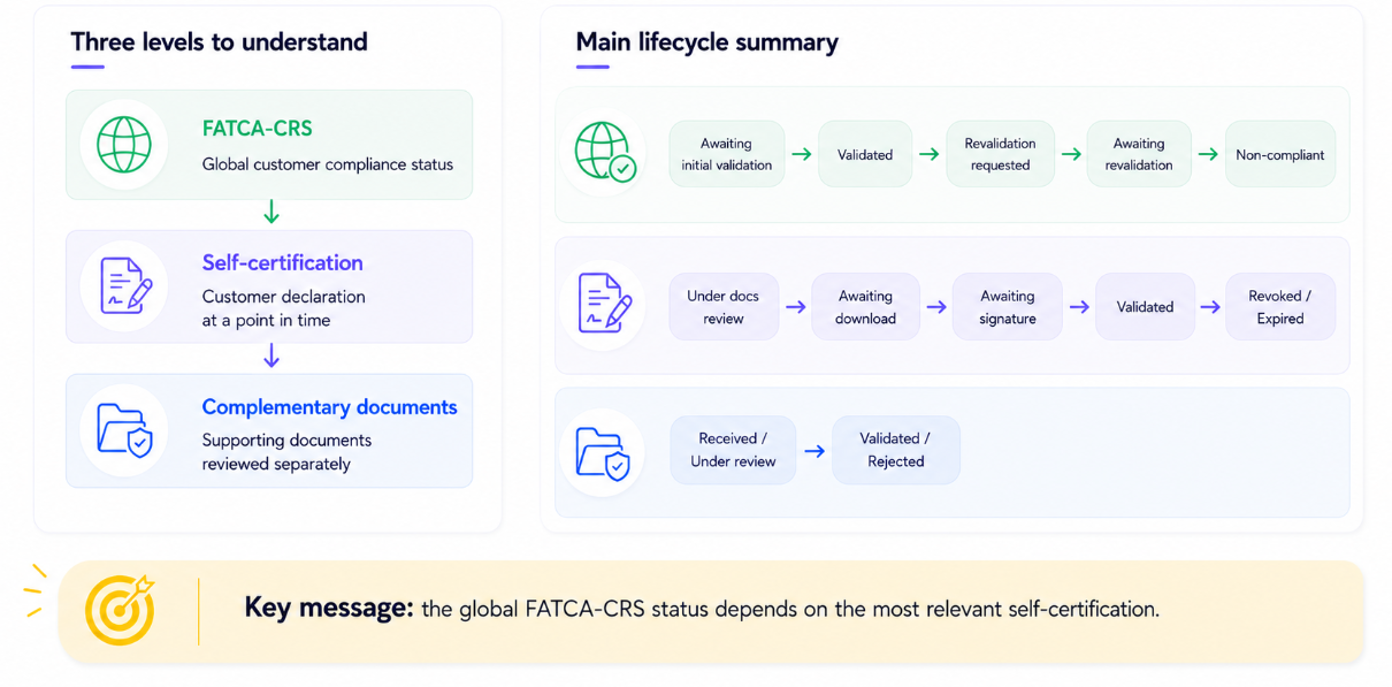
Global FATCA/CRS statuses
| Status | Meaning |
|---|---|
AwaitingInitialValidation | The first self-certification remains unsigned |
Validated | The customer has a valid signed self-certification |
RevalidationRequested | The current valid self-certification became obsolete and a new one is required |
AwaitingRevalidation | The customer started the requested replacement process |
NonCompliant | The customer did not complete revalidation before the deadline |
Remediation information
When revalidation is required, the resource may include:
| Field | Meaning |
|---|---|
remediationRequestedDate | Date on which revalidation was requested |
remediationReason | Reason the valid self-certification became obsolete |
remediationLimitDate | Deadline for signing the replacement self-certification |
firstCompliantDate | Date of the first valid signature |
Possible remediation reasons are:
SelfCertificationExpired;SelfCertificationRevokedByCustomer;CustomerInformationChanged.
A customer-information change may include a change to:
- residence country;
- birth country;
- nationality.
The process must only be considered complete when:
- the global FATCA/CRS status is
Validated; - the current self-certification is
Validated; - no mandatory attachment remains outstanding.
FATCA/CRS API and callback inventory
The following table summarizes the APIs and callbacks used in the FATCA/CRS journey.
APIs
| Method | Endpoint | Purpose | When to call it |
|---|---|---|---|
GET | /api/v3.0/tin-formats/version | Retrieve the current version of the Xpollens TIN-format referential | Periodically, or before deciding whether the cached TIN referential must be refreshed |
GET | /api/v3.0/tin-formats | Retrieve TIN mandatory rules, accepted formats, descriptions and regular expressions by country and user type | When no referential is cached, or when contentVersion changes |
PATCH | /api/v4.0/users/{appUserId}/fatca-crs | Create or update the customer's FATCA/CRS declaration and start a new self-certification journey | During initial onboarding, or after revocation/revalidation when tax information must be updated |
GET | /api/v4.0/users/{appUserId}/fatca-crs | Retrieve the current FATCA/CRS global status, remediation information and recent self-certifications | To display the current state, reconcile after callbacks, or recover from an ambiguous or missed event |
POST | /api/v3.0/users/{AppUserId}/fatca/attachments | Upload a required FATCA/CRS supporting document as Base64-encoded JSON | When the current self-certification requires one or more attachments |
GET | /api/v3.0/users/{AppUserId}/fatca/attachments/{Key} | Retrieve a previously uploaded FATCA/CRS attachment | When the partner needs to display or audit an uploaded diligence document |
GET | /api/v4.0/users/{appUserId}/fatca-crs-self-certification/{selfCertificationId} | Retrieve the detailed state of a self-certification, including required attachments and lifecycle data | To display the current state, reconcile callback information, or troubleshoot a blocked journey |
GET | /api/v4.0/users/{appUserId}/fatca-crs-self-certification/{selfCertificationId}/download | Download the self-certification PDF | When the status is AwaitingDownload, or later to retrieve the signed version when allowed |
POST | /api/sca/v4.0/users/{appUserId}/fatca-crs-self-certification/{selfCertificationId}/sign | Accept and sign the self-certification through Strong Customer Authentication | After the PDF has been downloaded and reviewed, while the status is AwaitingSignature |
POST | /api/v4.0/users/{appUserId}/fatca-crs-self-certification/{selfCertificationId}/reject | Reject the generated self-certification content | When the customer identifies incorrect information before signature |
POST | /api/sca/v4.0/users/{appUserId}/fatca-crs-self-certification/{selfCertificationId}/revoke | Revoke a currently valid self-certification through Strong Customer Authentication | When a valid declaration must be replaced because the customer requests a change or the information is no longer valid |
Callbacks
| Callback | Purpose | Trigger |
|---|---|---|
FatcaCrsCreatedOrUpdated | Asynchronously notifies the partner of a change to the overall FATCA/CRS declaration | Emitted when the persisted global FATCA/CRS status or remediation information changes, independently of the synchronous response returned by the API that initiated the change |
FatcaCrsSelfCertificationCreatedOrUpdated | Asynchronously notifies the partner of a change to a self-certification | Emitted when the self-certification lifecycle changes, including when attachments are required or when PDF generation, download, signature, validation, rejection, revocation or expiration changes its status |
FatcaCrsAttachmentCreatedOrUpdated | Notifies the partner of a change to one or more FATCA/CRS attachments | Emitted after an attachment is created or when its review status changes, for example Received, UnderReview, Validated or Rejected |
TinFormatsUpdated | Notifies the partner that a new TIN-format referential version is available | Emitted whenever the valid TIN-format content changes and Xpollens publishes a higher contentVersion |
Callback handling expectations
Callbacks must not be confused with the synchronous response of the API that initiated a change. A partner may receive the new state immediately in an API response and later receive a callback for the same persisted transition.
For every callback, the partner should:
- use
Webhook-Idas the idempotency key; - use
Webhook-Processdateas the callback emission timestamp; - acknowledge receipt quickly;
- process business logic asynchronously;
- tolerate duplicate and out-of-order delivery;
- retrieve the latest resource state through the corresponding GET API when the event payload is incomplete or ambiguous.
TinFormatsUpdated callback contract
TinFormatsUpdated callback contractThe callback is emitted when a new valid version of the TIN-format and mandatory-country referential becomes available.
Headers
| Header | Required | Description |
|---|---|---|
Webhook-Id | Yes | UUID of the callback |
Webhook-Processdate | Yes | Callback emission date |
Payload
{
  "type": "TinFormatsUpdated",
  "contentVersion": 2
}| Field | Description |
|---|---|
type | Callback type. The value is TinFormatsUpdated |
contentVersion | Current valid version of the TIN referential. The value increases whenever the referential content changes |
Expected responses
| HTTP status | Meaning |
|---|---|
202 | The callback was received successfully |
204 | The callback was received, but the partner is no longer interested in further updates |
Recommended processing
When the callback is received:
- compare its
contentVersionwith the locally cached version; - call
GET /api/v3.0/tin-formats/versionwhen reconciliation is required; - call
GET /api/v3.0/tin-formatswhen the received version is newer; - validate the returned
contentVersion; - replace the cached referential atomically;
- keep the previous valid version until the new referential has been fully loaded.
Partner logo
A partner logo is required to generate the self-certification PDF.
Format and size should be :
JPEG/PNG(prefered)372 × 100 px
74.2 × 19.3 mm
The logo should be tested in a generated pre-production PDF before go-live.
Test scenarios
The scenarios below preserve all cases described in the original FATCA/EAI documentation and add the API-validation cases introduced by the current FATCA/CRS APIs.
The exact statuses and attachments returned by Xpollens remain authoritative. In particular, the partner must use requiredAttachments rather than infer the final document list only from the customer profile.
Original FATCA/EAI consistency scenarios
| Customer personal data | Tax declaration | Expected consistency result | Expected FATCA result | Expected documents / comments |
|---|---|---|---|---|
Birth country: FRNationality: FRResidence: PT | Tax countries: PT | Vraisemblance: OK | FATCA: OK | The residence country is included in the tax declaration and no US indicia are present |
Birth country: USNationality: USResidence: FR | Tax countries: US, FR | Vraisemblance: OK | FATCA: NOK | A W9 is required because the customer declares US tax residency |
Birth country: FRNationality: FRResidence: US | Tax countries: US, FR | Vraisemblance: OK | FATCA: NOK | A W9 is required because the customer declares US tax residency |
Birth country: USNationality: USResidence: FR | Tax countries: PT, FR, IT | Vraisemblance: NOK | FATCA: NOK | The customer has US indicia but has not declared the United States as a tax country. Evidence is required to demonstrate that the customer is not a US taxpayer |
Birth country: USNationality: USResidence: FR | Tax country: US only | Vraisemblance: NOK | FATCA: NOK | A W9 is required for the US declaration. Additional supporting documents are also required because France, the residence country, is missing from the tax declaration |
Birth country: FRNationality: FRResidence: FR | Tax countries: PT, IT | Vraisemblance: NOK | FATCA: NOK | Additional supporting documents are required because France, the residence country, is missing from the tax declaration |
Mapping of historical results to the current APIThe previous version of the API used two direct results:
Vraisemblance status:OKorNOK;FatcaEai status:OKorNOK.The current v4 API exposes global FATCA/CRS and self-certification lifecycle statuses instead of these two historical result fields.
The scenarios above are retained to preserve the original business rules, but an implementation must verify the actual synchronous PATCH response and the subsequent callbacks, including:
- the global FATCA/CRS status;
- the self-certification status;
requiredAttachments;- attachment statuses.
The document types shown above are therefore expected business outcomes, not a replacement for the values returned by
requiredAttachments.
Current API validation and lifecycle scenarios
| Customer information | Declaration or operation | Expected behaviour |
|---|---|---|
Residence: PT; no US indicia | Tax country: PT with a valid TIN | No consistency attachment expected unless another indication exists |
US person: true | Tax countries include US | W9 should be returned in requiredAttachments when required by the Xpollens assessment |
US birthplace, US nationality or other US indicia, but US person: false | No US tax country | W8-Ben or other supporting evidence may be returned in requiredAttachments |
Residence: FR | Tax countries: PT, IT | OtherDocs should be expected to explain why France is absent from the tax declaration |
| Required TIN omitted | Tax country whose current rule has isTINMandatory: true | PATCH rejected with a TIN validation error |
| TIN format invalid | Value does not match regularExpression | PATCH rejected with TIN_INVALID |
| More than three tax countries supplied | Four or more entries in taxInformation | PATCH rejected because the API supports a maximum of three tax countries |
isUSPerson: true but US is absent | No US tax country | PATCH rejected with US_PERSON_INCONSISTENCY, or a FATCA inconsistency is returned according to the configured journey |
isUSPerson: false but US tax residency is declared | Tax countries include US | PATCH rejected with US_PERSON_INCONSISTENCY, or the declaration is flagged for FATCA review according to the configured journey |
| Valid certification already exists | Customer attempts PATCH without revocation | INVALID_OPERATION; revoke the current certification first |
| Self-certification requires attachments | Partner submits all requested documents | Attachment lifecycle progresses through the documented statuses; self-certification continues only after the required documents are accepted |
| Attachment rejected | Callback returns Rejected with reason/comments | Display the reason to the customer and upload a replacement document |
Self-certification status is AwaitingDownload | Partner downloads the PDF | Synchronous PDF response; status progresses to AwaitingSignature |
Self-certification status is AwaitingSignature | Customer signs through the SCA endpoint | Synchronous status UnderSignedPdfGeneration, followed asynchronously by Validated |
| Self-certification content is incorrect | Customer calls the reject endpoint | Self-certification becomes Rejected; a new process must be started through the PATCH |
| Valid self-certification is revoked | Customer completes the SCA revoke operation | Self-certification becomes Revoked; global FATCA/CRS status becomes RevalidationRequested |
| Revalidation deadline expires | Replacement self-certification is not completed | Global FATCA/CRS status becomes NonCompliant |
| Callback is duplicated or received out of order | Same Webhook-Id is replayed, or an older event arrives later | Process idempotently and reconcile the latest state through the corresponding GET API |
In pre-production, end-to-end scenarios involving document review should be coordinated with the customer integration manager because sandbox review may require manual intervention.
Pre-production testing
The test plan should cover:
- initial declaration without attachments;
- initial declaration requiring
W9; - initial declaration requiring
W8-Ben; - initial declaration requiring
OtherDocs; - valid and invalid TIN formats;
- mandatory and optional TIN countries, including France and non-CRS/EAI jurisdictions;
- TIN-referential version refresh;
- attachment upload;
- attachment review and rejection;
- unsigned PDF generation;
- first PDF download and transition to
AwaitingSignature; - signature with SCA;
- signed PDF generation;
- self-certification rejection;
- valid self-certification revocation with SCA;
- revalidation after customer-information change;
- revalidation after expiration;
- remediation deadline and
NonCompliant; - duplicate and out-of-order callbacks;
- callback reconciliation with GET endpoints.
Go-live checklist
- The SCA behaviour of
PATCH /fatca-crshas been formally confirmed. - The current TIN referential is loaded before collecting customer data.
- The TIN referential is refreshed when
contentVersionchanges. - The partner supports up to three tax countries.
- The partner displays the TIN format and mandatory status for each selected country.
- Historical TIN-optional cases are reconciled with the current
isTINMandatoryreferential. - The partner handles
US_PERSON_INCONSISTENCYandTIN_INVALID. - The v3 JSON/Base64 attachment upload contract is implemented and tested.
- FATCA diligence subtype IDs are mapped correctly.
- File extensions, Base64 encoding and size constraints are enforced.
- The effective request-level size limit has been confirmed.
- Attachment callbacks are processed idempotently.
- The partner waits for
AwaitingDownloadbefore downloading the unsigned PDF. - The partner displays the PDF before signing.
- The sign endpoint uses the required SCA journey.
- The partner handles
UnderSignedPdfGenerationbeforeValidated. - The partner handles customer rejection.
- The partner handles revocation and revalidation.
- The global, self-certification and attachment lifecycles are evaluated independently.
- The signed PDF remains available to the customer as required.
- The logo orientation and supported format are confirmed.
- All flows have been validated in pre-production.
Related resources
Updated about 2 months ago