

Identity document issued in the Schengen Area
To validate the relationship, end users must provide an identity document issued within the Schengen Area.
If an end user submits a document issued outside the Schengen Area, the ID verification is refused with the reason:
Unauthorized country of documentWebhook 4 example
"Payload": {
    "type": "4",
    "status": "Incomplete",
    "appUserId": "abcd",
    "kycLevel": "High",
    "workflowCode": "Electronic_Sign",
    "receivedDiligences": [
       {
            "reason": "Unauthorized country of document",
            "diligenceType": "PASSPORT",
            "status": "Refused",
            "comment": "Errors detected by OCR",
            "attachments": [
                {
                    "fileName": "abcd.jpg",
                    "attachmentKey": "4cb49c6f-77ea-4a3a-b49c-6f77eaea3a4a"
                }
            ]
      }
What to do
In this case, the end user must provide a different identity document issued within the Schengen Area to complete the validation.
For the Electronic_Sign workflow, this means that the webview must be displayed again to allow the user to upload a valid document.
Countries considered as part of the Schengen area
[
  "Andorra",
  "Austria",
  "Belgium",
  "Bulgaria",
  "Cyprus",
  "Czech Republic",
  "Denmark",
  "Estonia",
  "Finland",
  "France",
  "Germany",
  "Greece",
  "Hungary",
  "Iceland",
  "Ireland",
  "Italy",
  "Latvia",
  "Liechtenstein",
  "Lithuania",
  "Luxembourg",
  "Malta",
  "Monaco",
  "Netherlands",
  "Norway",
  "Poland",
  "Portugal",
  "Romania",
  "San Marino",
  "Slovakia",
  "Slovenia",
  "Spain",
  "Sweden",
  "Switzerland",
  "Vatican City"
]`
Exception to be taken into consideration
Identity documents that do not indicate the city of birth will be systematically rejected (for example, Portuguese ID cards).
In case of non-compliance, callback 4 will return the following error:
‘Unauthorized country of document’.
In this situation, the end user will be required to submit a new identity document issued by a Schengen-area member country in order to continue the onboarding process.
How to test
Create a user using this request body
POST /v2.0/users
{
  "appUserId": "{{appuserid}}",
  "profile": {
    "civility": "M",
    "firstName": "Mahmoud",
    "lastName": "SPECIMEN",
    "birthName": "SPECIMEN",
    "birthDate": "1949-11-22",
    "birthCity": "Ben Arous",
    "birthZipCode": "TN",
    "birthCountry": "TN",
    "nationality": "TN",
    "phoneNumber": "+33601020304",
    "email": "{{firstname}}_{{lastname}}[email protected]",
    "address": {
      "street": "18 rue de bruxelles",
      "supplementIn": "Access by the garden",
      "supplementOut": "Corner House",
      "zipCode": "59000",
      "city": "Lille",
      "country": "FR"
    }
  }
}
Then create the KYC:
POST /v3.0/users/appuserid/kyc/demand
{
   "workflowCode":"Electronic_Sign"
}
Using the webview, chose passport, and scan the following passport:
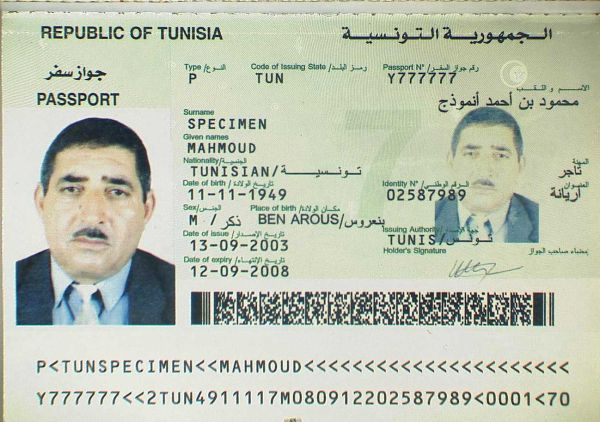
For more ID documents: https://www.consilium.europa.eu/prado/fr/search-by-document-country.html
Updated 11 months ago