

Account closure
Account closure
The closure of Xpollens accounts may occur in the following use cases:
- Account closure during an ongoing relationship
- End of relationship with a client (closure of all the client’s accounts)
- At the client’s initiative (e.g. changing banks)
- At the bank’s initiative (e.g. in the context of fraud detection)
- Closure of a single account without ending the relationship, at the client’s initiative (e.g. in the case of multiple accounts)
ImportantA request to close an account is irreversible.
State diagram of the account in the context of account closure
stateDiagram

state fork_state <<fork>>
Initialized	--> fork_state
Activated --> fork_state
Frozen --> fork_state

fork_state --> PendingClosure
PendingClosure --> fork_state
PendingClosure --> Closed: Accounting Balance €0 <br/> all operations are completed
Closed --> [*]
State diagram of the closure request
stateDiagram

    [*] --> InNoticePeriod : Account closure created </br> (with notice period)
    InNoticePeriod --> ClosureInProgress : 60 days notice period
    [*] --> ClosureInProgress : Account closure created </br> (without notice period)
    ClosureInProgress --> AwaitingBeneficiaryUpdate : Accounting Balance > 0€ </br> transfer failed</br> Beneficiary not found
    AwaitingBeneficiaryUpdate --> ClosureInProgress : Beneficiary Updated by Xpollens
    ClosureInProgress --> AwaitingFundsReturn : Accounting Balance > 0€ </br> Fraud closure reason
    AwaitingFundsReturn --> Completed : Funds return manually by Xpollens </br> Accounting Balance = 0€
    ClosureInProgress --> Completed : AccountingBalance = 0€</br> Account closed
    InNoticePeriod --> Canceled : Closure request</br> cancellation
    AwaitingBeneficiaryUpdate --> Canceled : Closure request </br> cancellation
    AwaitingFundsReturn --> Canceled : Closure request</br> cancellation
Closure duration
| Case | result | duration |
|---|---|---|
| Enduser initiated | account balance = 0€ all operations have a final status | immediate |
| Bank initiated | account balance = 0€ all operations have a final status | immediate |
| Bank initiated | except if motif = CommercialRelationshipEnd | 60 days |
Account closure initiated by enduser
Overview
The account is closed as soon as:
- the balance is €0
- all operations have a final status
As a consequence, the account can be closed immediately if these 2 conditions are validated.
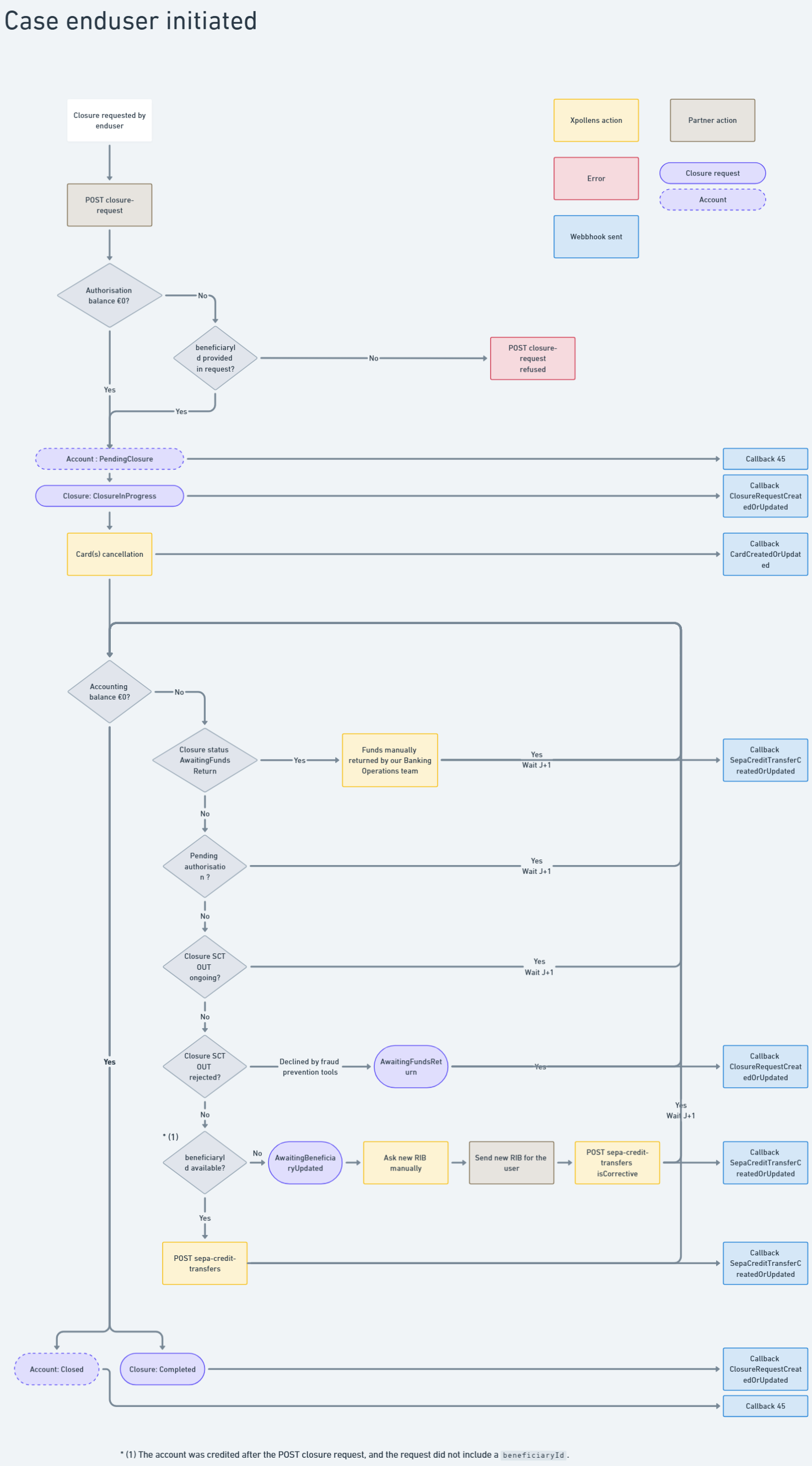
NoteThe account is closed as soon as the closure SCT OUT is sent to the interbank market. As with any SCT OUT, we cannot guarantee that the transfer will be successfully credited.
If the closure SCT OUT is returned — for example, if the external account is unavailable and the client account has already been closed — the funds will be credited to the partner's suspense account.
Closure reason & Notice period
| Motif | Description | Notice period |
|---|---|---|
| CommercialRelationshipEnd | End of commercial relationship with the client | No |
| BankingMobility | Change of bank as part of a banking mobility | No |
| Retractation | Termination of relationship under the right of withdrawal applicable after account opening. This right allows the account holder to revoke his or her decision to open an account, without penalty, within 14 working days.. | No |
Best practise
In the case where the end user requests an account closure, make sure the user has no outstanding debts before sending the API request.On Xpollens’ side, there is no condition related to the existence of debts before closing the account.
Proposed Closure Request Process (with VOP Controls for SCT OUT):
- Client Initiates Closure Request
- The client submits a closure request through the application.
- System Displays Waiting Page
- Once the request is received, your system shows a “processing” page to the client.
- In the background, your application performs all necessary calculations to determine whether any money exchanges are required.
- Execute Money Exchanges (if needed)
- Your system automatically carries out all required money exchanges.
- Initiate SCT OUT Transfer
- The SCT OUT transfer is triggered and passes through the VOP control check:
- a. Match:
- If the VOP control matches successfully, the SCT OUT is accepted.
- The system displays a success confirmation screen of the closure request.
- b. No Match / Close Match / Verification Impossible:
- If the VOP control does not match, the system displays a validation screen.
- The end user must manually approve the SCT OUT transfer.
- Upon approval, the system executes the transfer and displays a success confirmation screen of the closure request.
- a. Match:
- The SCT OUT transfer is triggered and passes through the VOP control check:
VOP documentation : https://docs.xpollens.com/docs/verification-of-payee-vop#/
Account closure initiated by the bank, with or without a notice period
Overview
In this case, the account remains available for 60 days. After this "notice period", the closure process starts.Please note that this case does not apply when the account is closed due to fraud.
The account is closed after a minimum of 60 calendar days, as soon as one of the following conditions is met:
- the balance is €0
- all operations have a final status
Functionnal diagram
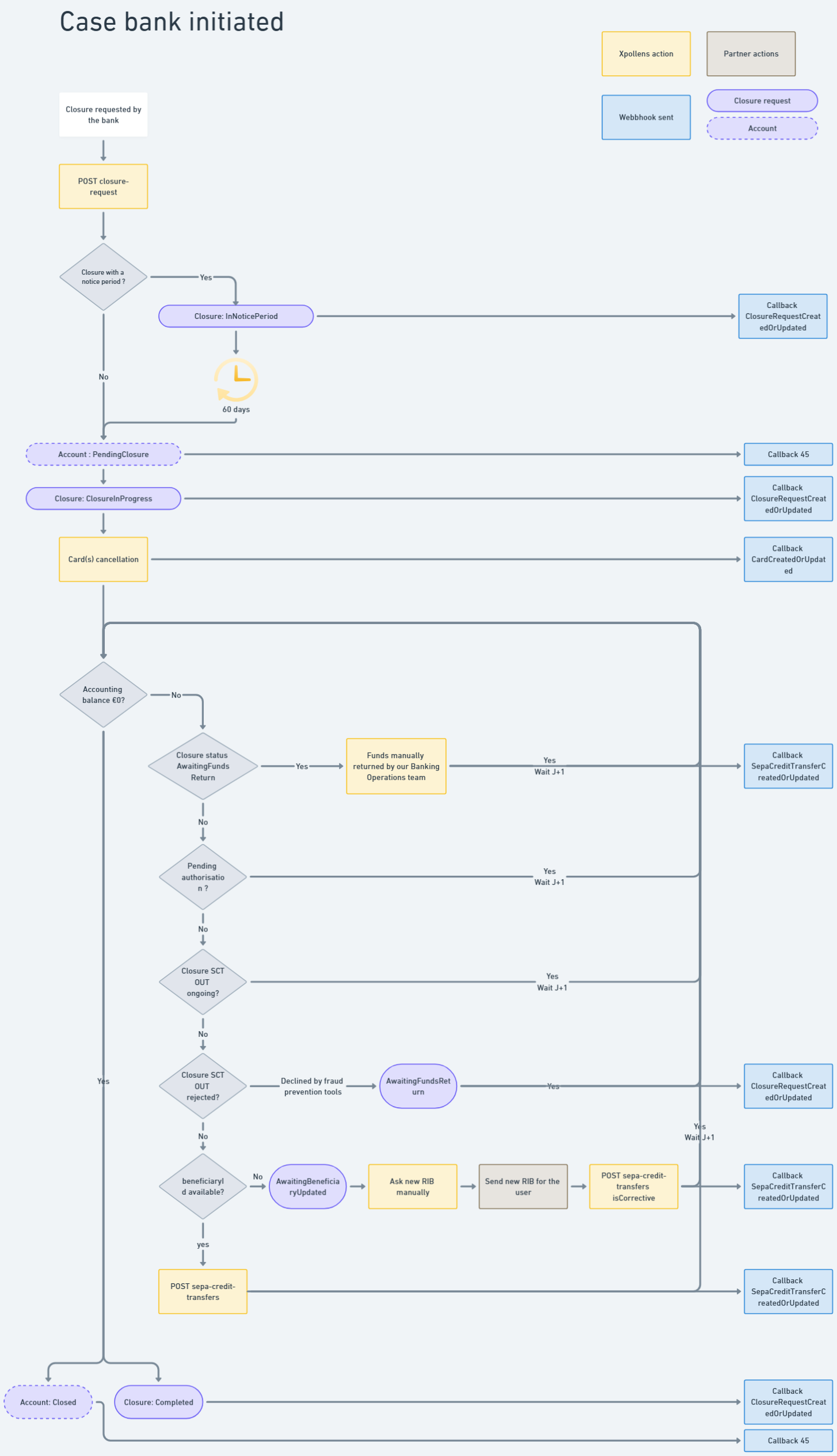
NoteThe account is closed as soon as the closure SCT OUT is sent to the interbank market. As with any SCT OUT, we cannot guarantee that the transfer will be successfully credited.
If the closure SCT OUT is returned — for example, if the external account is unavailable and the client account has already been closed — the funds will be credited to the partner's suspense account.
Closure reason & Notice period
| Motif | Description | Notice period |
|---|---|---|
| InactiveClient | No activity on account and no contact between the bank and the client | No |
| DeceasedClient | The client is deceased | No |
| Fraud | The client has confirmed fraudulent behaviour | No |
| ClientNotCompliantToU | Client not compliant with Xpollens Terms Of Use | No |
| CommercialRelationshipEnd | End of commercial relationship with the client | 60 days |
Closure condition
Case: account balance is 0 or beneficiaryAccountId available
As soon as the balance is €0, and all operations have a final status, the account is closed.
If the holder's balance has been credited during this period, all funds are automatically sent to the beneficiaryAccountId indicated in the request made for the closure-request.
sequenceDiagram
Title: Close the account
autoNumber
Actor User
Participant Partner
Participant XPO

alt Balance != 0
	XPO -->> User: SCT {beneficiaryAccountId}
	XPO -->> Partner: callback SepaCreditTransferCreatedOrUpdated
end
XPO -->> XPO: Account closure
XPO -->> Partner: callback 45 {accountStatus:Closed}
XPO -->> Partner: callback ClosureRequestCreatedOrUpdated {status:Completed}
Case: missing beneficiaryAccountId and non-zero balance during account closure request
When the closure is requested by the Client, but the beneficiaryAccountId is either not available or not provided, and the account still has a non-zero balance, it becomes impossible to execute the SCT OUT.
The affected account IDs are included in a specific report, listing all accounts that cannot be closed due to missing IBAN information.
Then next steps are manual:
- A Zendesk ticket is created and sent to you, containing the list of accounts requiring the IBAN.
- As a partner, you contact your end users to request the necessary IBAN information.
- Once retrieved, you update the Zendesk ticket with the required IBANs.
- The banking team modifies the closure request, and then processes a corrective SCT to transfer the remaining balance.
sequenceDiagram
Title: Close the account
autoNumber
Actor User
Participant Partner
Participant XPO

XPO -->> Partner: callback ClosureRequestCreatedOrUpdated {status:AwaintingBeneficiaryUpdate}

XPO -->> Partner: zendesk
Partner  -->> User: iban requested
User -->> Partner : iban completed
Partner -->> XPO: zendesk completed

XPO -->> XPO: manual actions to add beneficiary to the closure request and create SCT OUT

XPO -->> Partner: callback SepaCreditTransferCreatedOrUpdated {"direction": "Debit", "isCorrective": true}

XPO -->> XPO: Account closure
XPO -->> Partner: callback 45 {accountStatus:Closed}
XPO -->> Partner: callback ClosureRequestCreatedOrUpdated {status:Completed}
NoteCorrective SCT operations are only available for Xpollens teams.
ClosureRequest cancellation
A closure request can be canceled only when its status is not Completed. Once the closure has taken effect, the account cannot be reopened.
If a card has been canceled during the account closure, it remains canceled. The end user will need to order a new one.
This action can only be performed by Xpollens.
Transaction accepted or refused
During the PendingClosure period
| Type of transaction | Acceptation |
|---|---|
| SCT OUT | Refused |
| SCT IN | Refused |
| Recall SCT OUT | Accepted |
| Recall SCT IN | Refused |
| IP IN | Refused |
| IP OUT | Refused |
| Recall IP IN | Refused |
| Recall IP OUT | Refused |
| SDD IN | Refused |
| SDD OUT | Refused |
| Top-up | Refused |
| Refund Top-up | Refused |
| Top-up contestation | Accepted |
| Card out authorisation | Refused |
| Card out settlement | Accepted |
| Card out offline | Accepted |
| Card in (card out refund) | Accepted |
| Card out contestation | Accepted |
| P2P | Refused |
| Debt | Accepted |
| Corrective operation (internal XPO) | Accepted |
NoteIf charges are to be levied, it is important to do so before the account closure request.
As soon as the account is closed
| Type of transaction | Acceptation |
|---|---|
| SCT OUT | Refused |
| SCT IN | Refused |
| Recall SCT OUT | Refused |
| Recall SCT IN | Refused |
| IP IN | Refused |
| IP OUT | Refused |
| Recall IP IN | Refused |
| Recall IP OUT | Refused |
| SDD IN | Refused |
| SDD OUT | Refused |
| Top-up | Refused |
| Refund Top-up | Refused |
| Top-up contestation | Charged to the Xpollens's holding account |
| Card out authorisation | Refused |
| Late card out settlement | Charged to the Xpollens's holding account |
| Card out offline | Charged to the Xpollens's holding account |
| Card in (card out refund) | Charged to the Xpollens's holding account |
| Card out contestation | Charged to the Xpollens's holding account |
| P2P | Refused |
| Debt | Charged to the Xpollens's outstanding account |
| Corrective operation (internal XPO) | Accepted |
NoteOperations credited in the Xpollens's outstanding account are refunded manually to the enduser.
Suspended operations
In the event of receiving a credit or debit transaction on a closed account, the transaction is created with a "Suspended" status. The end user's account is not debited or credited; instead, the partner's suspense account is impacted.
sequenceDiagram
Title: Transaction on a closed account
autoNumber
Actor User
Participant Partner
Participant XPO
Participant BPCE

Note over Partner, XPO: Account closed
BPCE -->> XPO: operation
XPO -->> Partner: callback CardOperationCreatedOrUpdated {"status": "Suspended", <br>"cardOperationType": "CardPayment"}
Technical items
Closure request
POST /api/v3.0/accounts/accountId/closure-request
Warning
if the end user is a prospect, with no funds in their bank account: you can use the API without the
beneficiaryAccountId.if the enduser's account is validated or has funds, the request must include the
beneficiaryAccountId. Without this, the account can never be closed, as the account balance will never be €0.:::
In the case that the external account used to receive the funds is frozen / blocked / closed / ..., the funds cannot be returned.In this case, a manual intervention by Xpollens will be necessary to return the accounts to another account.
Get closure request
Callback account status (45)
Callback ClosureRequestCreatedOrUpdated
    "Payload": {
        "type": "ClosureRequestCreatedOrUpdated",
        "partnerCode": "oney",
        "closureRequestId": "5a6e23fe-38e2-4e40-bba8-38d53c55adea",
        "accountId": "7tidihh3np",
        "reason": "KycEconomicDocument",
        "initiative": "Bank",
        "status": "InNoticePeriod",
        "noticeEndDate": "2025-07-02T14:04:29.1829217Z",
        "beneficiaryId": "a3b13f91-96a4-471b-a310-034dc228c490"
    }
Best pratices
Collect debts before closing the account
Commission cannot be taken out once the account has been closed.It is therefore essential to collect debts before closing the account.
Remove the charges taken from these accounts in the batches
Commission cannot be taken out once the account has been closed.It is therefore essential that accounts in ClosureRequested, Pendingclosure and Closed status are removed from the fee-taking batches.
FAQ
FAQ1: What should your application do when a customer requests account closure?
When a customer initiates an account closure request, your application should immediately restrict access to the following functionalities:
- SEPA Transfers: Block both standard SEPA Credit Transfers (SCT) and Instant Payments (IP).
- Card Creation: Disable the ability to request or issue new cards
- Mandate & SDD Creation: Prevent the creation of new mandates and SEPA Direct Debits (SDD).
If a request is made to any of these functionalities after the account closure request, a 40x error will be returned.
FAQ2: When is the latest account statement available?
The last account statement is generated in the first few days after the account status is changed to Closed.
FAQ3: how to test
To allow testing, the closing delay time in sandbox is immediate. As a consequence, the expectedCloseDate is set to the date of the closure request.
To achieve "Closed" status, the following prerequisites must be met:
- All operations must have a final status (i.e., all card authorizations are either completed or expired).
- The account balance must be €0, both in terms of authorization balance and accounting balance.:::
How to test
On sandbox, the closure period is setted to 1 min.
As a result, each account closed during the day will be fully closed at night during our daily batch process.
Updated 8 months ago