

Digital scoring
Digital scoring
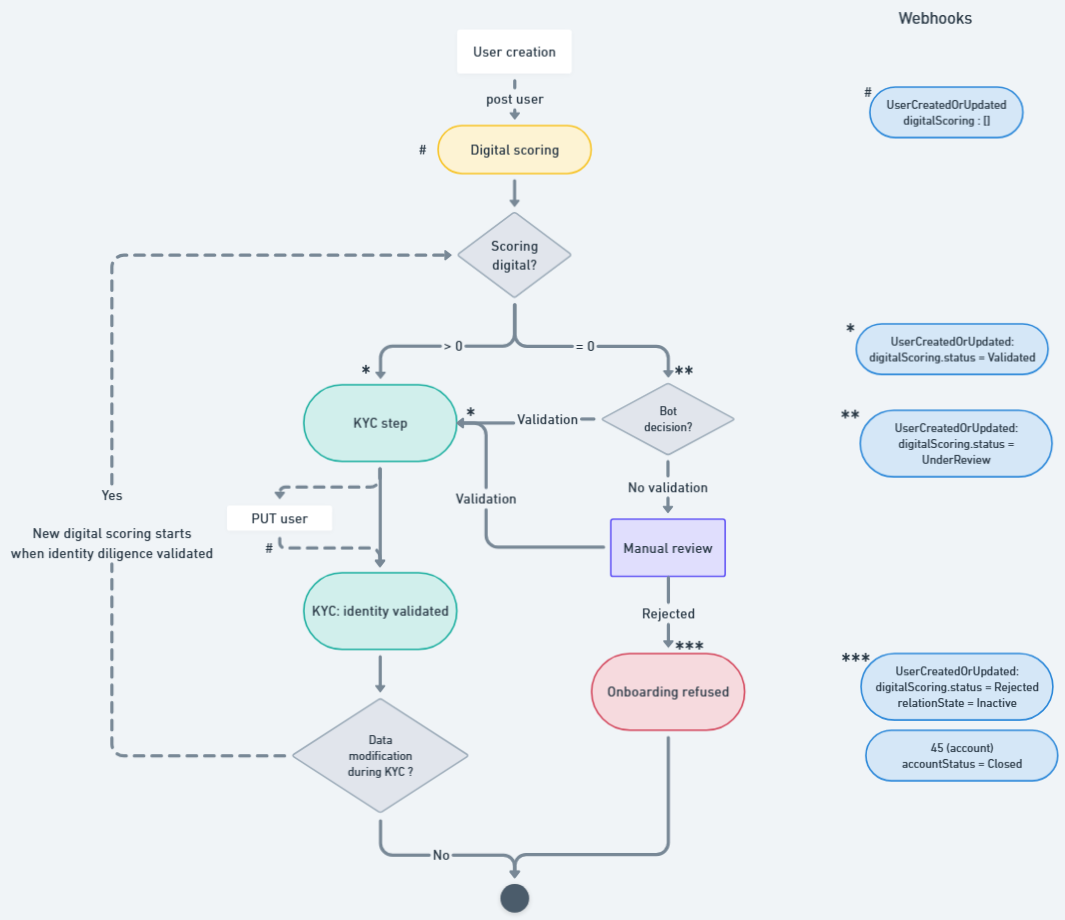
The digital scoring is a score calculated with the data declared by the enduser. This score allows to struggle efficiently against fraudulent behavior and users.
Main information
- The digital scoring is performed as soon as the POST user is Validated.
- The digital score is received within 3 seconds.
- The digital scoring has to be Validated to create the KYC demand.
- As soon as the scoring is UnderReview, a manual review is mandatory.
- SLA for manual review is 24h.
Sequence diagram
sequenceDiagram
Title: Scoring digital
autonumber
Actor User
participant Partner
participant XPO
participant Scoring Digital Provider

Note over User, XPO: User creation
User -->> Partner : profile creation
Partner ->> XPO : post user
XPO ->> Partner : http 20x
XPO -->> Partner: webhook UserCreatedOrUpdated {"digitalScoring": null}
XPO ->> Scoring Digital Provider : scoring requested
ImportantAs long as the digital scoring is not accepted or ignored, the KYC demand can NOT be created.
In case of POST kyc/demand, an error 422 is received: message "The KYC request cannot be processed due to an invalid digital scoring state."
Technical aspect
The scoring is an integer ranging from 0 to 100.
This information is provided through the UserCreatedOrUpdated webhook and the GET /user endpoint (version 3.0 or higher). The attribute digitalScoring.score displays a numeric value X, which corresponds to the scoring result.
ImportantYou can not display
digitalScoring.scoreto your endusers. This information is confidential.
`{
    "type": "UserCreatedOrUpdated",
    "appUserId": "7680b51bJ",
    "digitalScoring": {
        "status": "Validated",
        "score": 54
    },
    ...
}
States diagram
stateDiagram

[*] --> Validated
[*] --> UnderReview : manual review needed
[*] --> Ignored : no response from the digital scoring provider

UnderReview --> Validated
UnderReview --> Rejected: after manual review, Rejected
Ignored --> Validated: if performed again and OK
Ignored --> [*]
Ignored --> UnderReview: if performed again and under review

Validated --> [*]
Rejected --> [*]
SLA for UnderReview is 24h.
Digital scoring immediately validated
When the score exceeds the reference value, the digital scoring is considered accepted, and a Validated status is returned immediately.
The reference value is fixed by the Compliance team, and is usally 0.
sequenceDiagram
Title: Scoring digital OK
autonumber
Actor User
participant Partner
participant XPO
participant Digital Scoring Provider

XPO ->> Digital Scoring Provider : scoring requested

break scoring calculation
	 Digital Scoring Provider -->XPO: SLA 3 sec
end

rect rgb(236,255,232)
  Digital Scoring Provider -->> XPO : Scoring OK
  XPO -->> Partner: webhook UserCreatedOrUpdated {digitalScoring.status: "Validated"}
end
  Partner ->> XPO : POST kyc/demand
  XPO -->> Partner: webhook 4 (KYC)
	XPO -->> Partner: webhook 35 (Wallet enrolment)
Digital scoring immediately Ignored
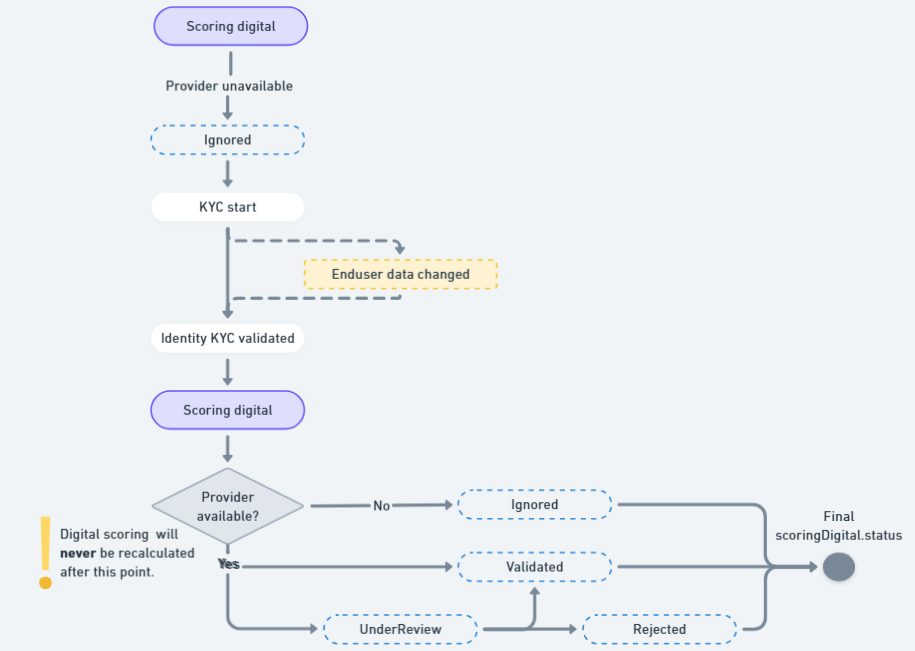
In the case we have no answer from the digital scoring provider, the status changes for Ignored.
The SLA for our provider is 99,9%. As a consequence, this use case will be extremely rare.
sequenceDiagram
Title: Scoring digital OK
autonumber
Actor User
participant Partner
participant XPO
participant Digital Scoring Provider

XPO ->> Digital Scoring Provider : scoring requested

break scoring calculation
	 Digital Scoring Provider -->XPO: SLA 3 sec
end

rect rgb(245,245,245)
  Digital Scoring Provider -->> XPO : no response
  XPO -->> Partner: webhook UserCreatedOrUpdated {digitalScoring.status: "Ignored"}
  end

  Partner ->> XPO : POST kyc/demand
	XPO -->> Partner: webhook 4 (KYC)
	XPO -->> Partner: webhook 35 (Wallet enrolment)
Digital scoring UnderReview
The end-user relationship is never automatically refused when the score is below the reference value. Any score lower than the reference value requires manual action to either accept or decline the relationship.
Case: Investigation and validation
sequenceDiagram
Title: Scoring digital
autonumber
Actor User
participant Partner
participant XPO
participant Scoring Digital Provider

XPO ->> Scoring Digital Provider : scoring requested

break scoring calculation
	 Scoring Digital Provider-->XPO: SLA 3 sec
   end

rect rgb(253,255,217)
	Scoring Digital Provider -->> XPO : UnderReview
	XPO -->> Partner: webhook UserCreatedOrUpdated {digitalScoring.status: "UnderReview"}
  end

break R-bot validation
	Scoring Digital Provider-->XPO: SLA 10 s
  end
rect rgb(236,255,232)
	Scoring Digital Provider -->> XPO : OK
	XPO -->> Partner: webhook UserCreatedOrUpdated {digitalScoring.status: "Validated"}
end

Partner ->> XPO : POST kyc/demand
NoteSLA is 10sec, 24/7.
Case: Investigation and refusal
In this case, the onboarding is refused, and the commercial relationship ends.
sequenceDiagram
Title: Scoring digital
autonumber
Actor User
participant Partner
participant XPO
participant Scoring Digital Provider

XPO ->> Scoring Digital Provider : scoring requested

break scoring calculation
	 Scoring Digital Provider-->XPO: SLA 3 sec
end

rect rgb(253,255,217)
	Scoring Digital Provider -->> XPO : UnderReview
	XPO -->> Partner: webhook UserCreatedOrUpdated {scoringStatus: "UnderReview"}
  end

break R-bot review
	Scoring Digital Provider-->XPO: 10s - Can not validate
end


break manual refusal
	Scoring Digital Provider-->XPO: manual review
end

rect rgb(255,225,224)
	Scoring Digital Provider -->> XPO : Rejected
  XPO -->> Partner: webhook UserCreatedOrUpdated {relationState.status: "Inactive", relationState.reasons = 'NotCompliant' <br/> recordStatus : "Refused", <br/> scoringStatus: "Rejected" }
	XPO -->> Partner: webhook ClosureRequestCreatedOrUpdated {status: ClosureInProgress}
  XPO -->> Partner: webhook 45 {accountStatus: "PendingClosure"}
end
NoteThe refusal has to be validated manually. As a consequence, it is performed only during working days & working hours.
Digital scoring recalculation
For now, the score is only recalculated once, only if the enduser's personal data are changed before its identity validation.
As a consequence, the digitalScoring.status can change.
sequenceDiagram
Title: Scoring digital OK
autonumber
Actor User
participant Partner
participant XPO
participant Scoring Digital Provider
participant KYC Provider

XPO -->> Partner: webhook UserCreatedOrUpdated {digitalScoring.status: "Validated"}
Partner ->> XPO : POST kyc/demand

User -->> Partner: personal data change
Partner ->> XPO: put /sca/user

User -->> KYC Provider: identity validation
KYC Provider -->> XPO: identity validated
XPO -->> Partner: webhook 4

XPO -->> Scoring Digital Provider : scoring requested
break scoring calculation
	 Scoring Digital Provider-->XPO: SLA 3 sec
end
	 Scoring Digital Provider-->XPO: Validated / UnderReview
There is no recalculation as soon as the KYC is validated.
How to test
To focus on a specific use case, you can use the following patterns:
- [email protected] for a digital scoring Validated
- [email protected] for a digital scoring UnderReview.
- [email protected] for a digital scoring Rejected.
Please note this workflow is not iso-production (you can not have directly a status Rejected), but allows you to retrieve a status Rejected.
Don't forget to add the Netheos mock if you want to validate the KYC after the user creation: [email protected]
Example: [email protected] for a case OK digital scoring + OK kyc
You can not test with real data. All tests without mock will retrieve a status UnderReview.
If you want to refuse a case under review, ask your Customer Integration Manager to validate or refuse the onboarding according to the expected scenario.
In sandbox, only yopmail is accepted for temporary email addresses.
FAQ
Can we use temporary email address for tests in sandbox?
If you want to use temporary email address in sandbox for nominal onboardings, you need to ask for an exemption to your Customer Integration Manager.
In production, these addresses are systematically refused.
Do you perform recalculation after a put user when the identity is validated?
For now, no.
Can I have access to the Digital Scoring Provider webdesk?
No, the webdesk is reserved for Xpollens internal usages.
Updated 5 months ago