

Proof of income
Definition
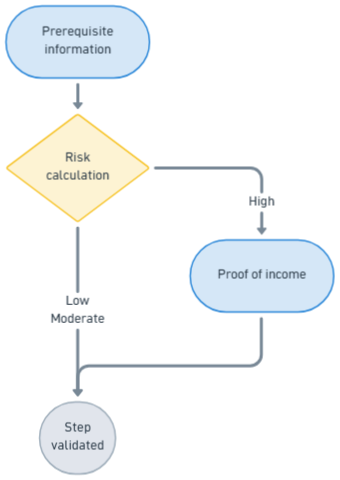
During the onboarding process, each customer is assessed from an AML/CFT perspective.
If a customer is deemed to pose an increased risk, proof of income is requested as part of enhanced due diligence. This document is reviewed and validated by our KYC provider.
Sequence diagram
sequenceDiagram
Title: Proof of income
autoNumber
Participant User
Participant Partner
Participant XPO
Participant KYC provider


Note over User, XPO: Risk calculation
	XPO -->> XPO: risk calculation


Note over User, XPO: case risk high
rect rgb(251, 251,218)

XPO -->> Partner: webhook IncomeDemandChanged	 {status:Initialized}
Partner -->> User: proof of income expected
User -->> Partner: download proof of income
Partner ->> XPO : POST 3.0/users/{appUserId}/income/attachments
XPO -->> Partner: webhook IncomeDemandChanged	 {status:Pending}
XPO -->> KYC provider: send proof of income
KYC provider -->> XPO: proof validated
XPO -->> Partner: webhook IncomeDemandChanged	{status:Complete}

end
Status diagram
There are two statuses: the step status, and the status(es) of the income documentation.
Demand status: status
statusStatus in the ressource income
stateDiagram

[*] --> Initialized: Open case on the provider's KYC side

Initialized -->Pending:proof of income expected
Pending --> Complete: proof of income validated
Pending --> Incomplete:proof of income refused
Incomplete --> Pending: new document submitted
Pending --> Rejected: document rejected and limit reached
Pending --> Expired:after 90 days
Pending --> FraudSuspicion

Complete --> [*]
Rejected  --> [*]
Expired  --> [*]
FraudSuspicion  --> [*]
Diligence statusreceivedDiligences.status
receivedDiligences.statusstateDiagram [*] --> Received: proof of income received Received --> Refused: proof of income refused Received --> Validated:proof of income Validated Refused --> [*] Validated --> [*]
Rules
Dependencies between the statuses of the document, the step, and the user
When the demand is rejected for IncomeReopening , the user can resubmit a new income document.
However, for other use cases, the step is refused. The relationState.status changes for AwaitingInactivation; the user is going to be closed.
| Case | receivedDiligences.status | (demand) status | relationState .status | relationState .reasons |
|---|---|---|---|---|
| Proof of income refused | Rejected | InProgress | N/A | IncomeReopening |
| 3 attempts refused | Rejected | Refused | AwaitingInactivation | IncomeReopeningLimitReached |
| After 90 days without validation | Expired | Refused | AwaitingInactivation | IncomeTimedOut |
| Fraud suspicion | FraudSuspicion | Refused | AwaitingInactivation | IncomeFraudConfirmed |
Expected document
The required document is the tax assessment notice issued by the user's country of residence.
This document is controled automatically for France, manually for other countries.
Sequence diagram: red flow example
Here is the exemple for "3 attemps refused"
sequenceDiagram
Title: Proof of income refused
autoNumber
Participant User
Participant Partner
Participant XPO
Participant KYC provider


Note over User, XPO: Risk calculation
	XPO -->> XPO: risk calculation

Note over User, XPO: case risk high
rect rgb(255,235,232)

loop 3 times

  XPO -->> Partner: webhook IncomeDemandChanged	 {status:Initialized}
  Partner -->> User: proof of income expected
  User -->> Partner: download proof of income
	Partner ->> XPO : POST 3.0/users/{appUserId}/income/attachments
  XPO -->> Partner: webhook IncomeDemandChanged	 {status:Pending}
  XPO -->> KYC provider: send proof of income
  KYC provider -->> XPO: proof refused
  XPO -->> Partner: webhook IncomeDemandChanged	{status:Refused, receivedDiligences.status:Refused}

end

XPO -->> Partner: webhook UserCreatedOrUpdated	{relationState.status:Inactive, relationState.reasons:IncomeReopeningLimitReached}

end
How to test
You send a request via the usual upload endpoint, naming the attachment with
an “xp_” prefix followed by a keyword. The system intercepts the response and simulates the
corresponding status.
| File name | Result | Example |
|---|---|---|
| xp_accepted.pdf | Diligence validated | xp_accepted.pdf |
| xp_ | Diligence Refused, with reason code <reasonCode> | xp_document_front_missing.pdf |
| xxx.pdf (withou "xp_" prefix) | Real behavior | income.pdf |
| xp_unknown_keyword.pdf | Real behavior | xp_income.pdf |
Common reason codes:
- DOCUMENT_FRONT_MISSING, DOCUMENT_BACK_MISSING
- DOCUMENT_EXPIRED, DOCUMENT_TOO_OLD
- DOCUMENT_UNREADABLE, DOCUMENT_QUALITY_INSUFFICIENT
- NAME_MISMATCH, DOB_MISMATCH
- IBAN_NAME_MISMATCH, TAX_NOTICE_VERIFICATION_FAILED
| Example | Result |
|---|---|
| xp_document_front_missing.pdf | Refused — reason code DOCUMENT_FRONT_MISSING |
| xp_document_expired.png | Refused — reason code DOCUMENT_EXPIRED |
| xp_name_mismatch.jpg | Refused — reason code NAME_MISMATCH |
FAQ
Updated 3 months ago