

Verification Of Payee (VOP)
For each SCT or IP, a verification is performed to control that the beneficiary of the SCT is the account holder.
Overview
The goal of the Verification of Payee feature is to help prevent fraud by verifying that the beneficiary of a Sepa Credit Transfer (SCT) or Instant Payment (IP) is the intended recipient.
The verification is performed by comparing the displayName - entered when the beneficiary is added- with the account holder’s name at the external bank.
These two names must match. Otherwise, the end user will need to either validate or cancel the transaction.
When comparing names, four outcomes are possible:
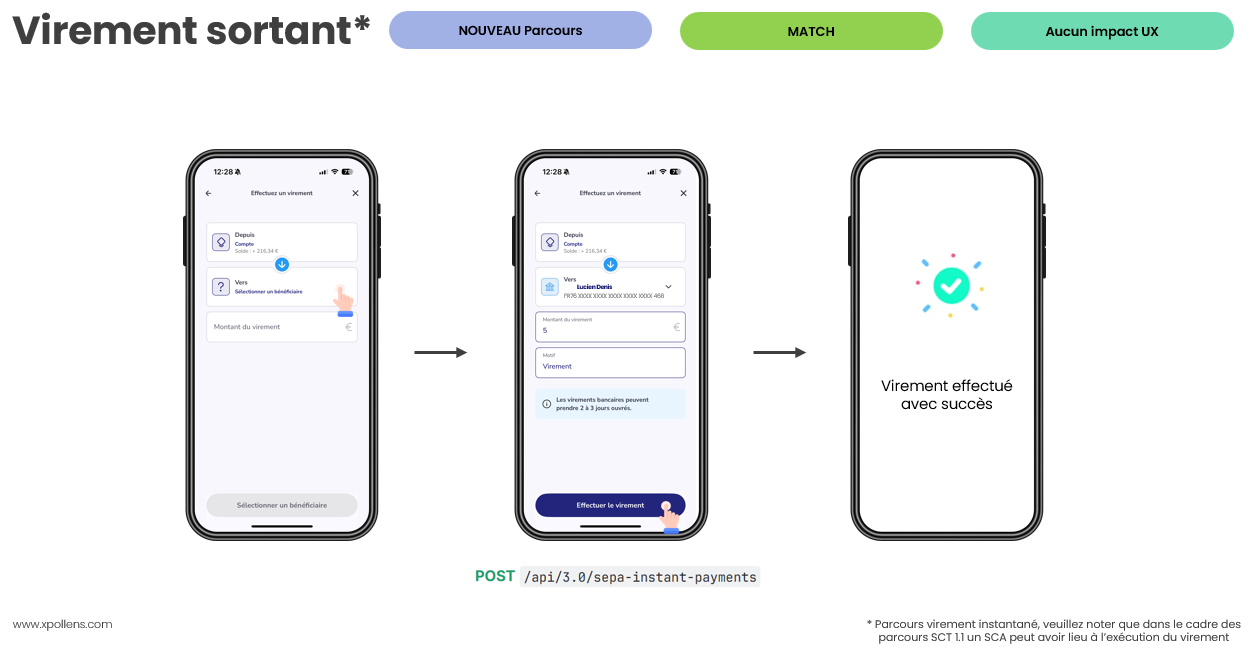
- Match: the names are identical. No action is required from the end user.
- Closematch: the names are similar but not identical. The end user must confirm the transaction.
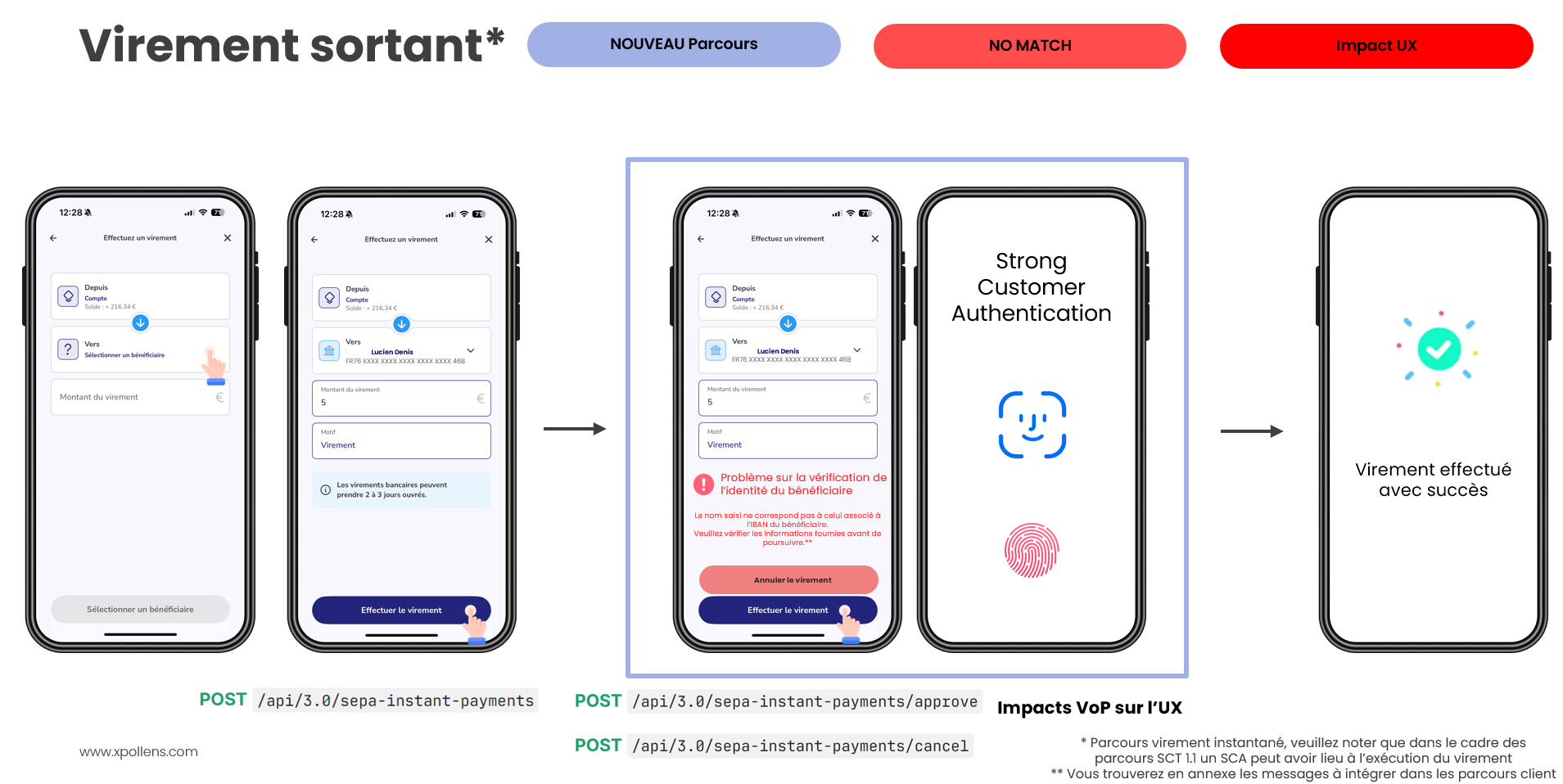
- No match: the names are different. The end user may still choose to validate the transaction.
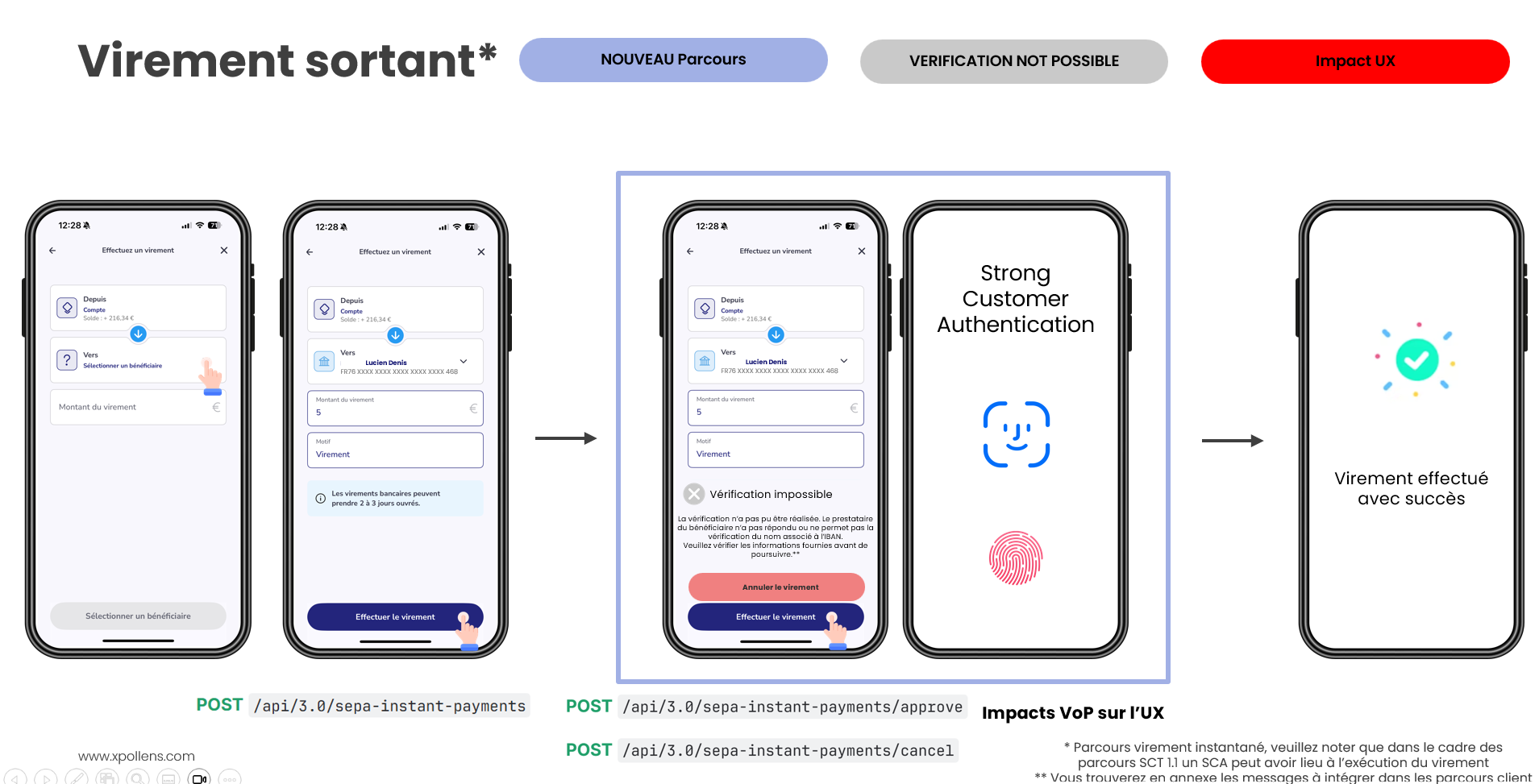
- Verification not possible
Each bank uses its own algorithm to compare names. As a consequence, resultas can differ from one another.
VOP status
stateDiagram

[*] --> Null : VOP not process yet
Null --> WaitingForApproval : CloseMatch / NoMatch / VerificationNotPossible
Null --> Approved: Match
WaitingForApproval --> Approved
WaitingForApproval --> Canceled

Approved --> [*]
Canceled --> [*]
Sequence diagram
SCT
sequenceDiagram
autoNumber
Actor User
Participant Partner
Participant XPO
Participant ExternalBank

Note over User, XPO: Add beneficary
User --) Partner : Add beneficiary
Partner ->> XPO: POST api/sca/v2.0/users/{appUserId}/beneficiary {displayName: "X"}
XPO ->> Partner: http 20x {beneficiaryId}

Note over User, XPO: Create SCT
User --) Partner : create SCT
Partner ->> XPO: POST api/v2.0/sepa-credit-transfers {beneficiaryId}
XPO ->> ExternalBank: VOP requested
ExternalBank ->> XPO : VOP response


Alt  ----------------- Case match -----------------
	XPO ->> Partner: http 20x {verificationOfPayee.result:"Match"}
	XPO -->> Partner: webhook SepaCreditTransferTransferCreatedOrUpdated <br/> {status:"Approved", <br/> verificationOfPayee.result:"Match"}


else  ----------------- Case Close Match -----------------
	XPO ->> Partner: http 20x <br/> {verificationOfPayee <br/>{result:"CloseMatch", status:"WaitingForApproval"}}
	Partner -->> User: Notification

Note over User, XPO: Choice between approve and cancel, here an example with approve
	rect rgb(236,255,232)
		User -->> Partner : validate SCT
		Partner ->> XPO: POST /api/sca/v2.0/users/{userId}/sepa-credit-transfers/<br/>{sepaCreditTransferId}/vop/{verificationOfPayeeId}/approve
		XPO -->> User: SCA notification
		User -->> XPO: SCA validated
    XPO -->> Partner: webhook SepaCreditTransferTransferCreatedOrUpdated <br/> {status:"Approved", <br/> verificationOfPayee {status:"Approved"}<br/>}
    end


else ----------------- Case No Match -----------------
	XPO ->> Partner: http 20x <br/> {verificationOfPayee.result:"NoMatch"}
	XPO -->> Partner: webhook SepaCreditTransferTransferCreatedOrUpdated <br/> {status:"Approved", <br/> verificationOfPayee.result:"NoMatch", status:"WaitingForApproval"}
	Partner -->> User: Notification

Note over User, XPO: Choice between approve and cancel, here an example with cancel
	rect rgb(255,224,224)
		User -->> Partner : cancel SCT
		Partner ->> XPO: POST /api/sca/v2.0/users/{userId}/sepa-credit-transfers/<br/>{sepaCreditTransferId}/vop/{verificationOfPayeeId}/cancel
		XPO -->> User: SCA notification
		User -->> XPO: SCA validated
    XPO -->> Partner: webhook SepaCreditTransferTransferCreatedOrUpdated <br/> {status Canceled, <br/> verificationOfPayee {status:"Canceled"}<br/>}


end
end
Instant payment
For an instant payment, the workflow remains the same; only the POST sepa-instant-payments and the webhook name change (InstantPaymentCreatedOrUpdated).
Useful links
Approve
- SCT : https://docs.xpollens.com/reference/approvependingsct#/
- IP: https://docs.xpollens.com/reference/post_api-v3-0-sepa-instant-payments-sepainstantpaymentid-vop-verificationofpayeeid-approve#/
Cancel:
- SCT: https://docs.xpollens.com/reference/cancelpendingsct#/
- IP: https://docs.xpollens.com/reference/post_api-v3-0-sepa-instant-payments-sepainstantpaymentid-vop-verificationofpayeeid-cancel#/
Functionnal rules
VOP duration
In case of CloseMatch or NoMatch, the VOP has a lifespan of 5 minutes.
If no response is given within 5 minutes, the SCT or IP is canceled.
If the SCA is refused by the end user, the VOP decision is not automatically rejected: the decision must be made by completing either a full validation or a cancellation.
Authorization balance impacts
For an SCT, the authorization balance is debited when the POST is processed. The balance is reimbursed if the VOP is cancelled.
For an IP, the authorisation balance is debited only if the VOP is validated.
Message VOP
Please, find below the message you need to display in your notification when an enduser action is required.

Le nom saisi est similaire à celui associé à l’IBAN: [suggestedName*], mais une différence a été détectée. Veuillez vérifier les informations fournies avant de valider le virement.
Si vous décidez de poursuivre l’opération et que le virement est exécuté à la mauvaise personne, vous acceptez que ce virement ne puisse vous être remboursé et votre prestataire de services de paiement ne saurait en être tenu responsable.
[Choix 1 : Poursuivre l’opération]
[Choix 2 : Annuler l’opération]

Le nom saisi ne correspond pas à celui associé à l’IBAN du bénéficiaire. Veuillez vérifier les informations fournies avant de poursuivre.
Si vous décidez de poursuivre l’opération et que le virement est exécuté à la mauvaise personne, vous acceptez que ce virement ne puisse vous être remboursé et votre prestataire de services de paiement ne saurait en être tenu responsable.
[Choix 1 : Poursuivre l’opération]
[Choix 2 : Annuler l’opération]

La vérification n’a pas pu être réalisée. Le prestataire du bénéficiaire n’a pas répondu ou ne permet pas la vérification du nom associé à l’IBAN.
Si vous décidez de poursuivre l’opération et que le virement est exécuté à la mauvaise personne, vous acceptez que ce virement ne puisse vous être remboursé et votre prestataire de services de paiement ne saurait en être tenu responsable.
[Choix 1 : Poursuivre l’opération]
[Choix 2 : Annuler l’opération]
In case of "Verification not possible," you cannot make the decision on behalf of the end user..
Journey examples
VOP result = Match
VOP result = Close match
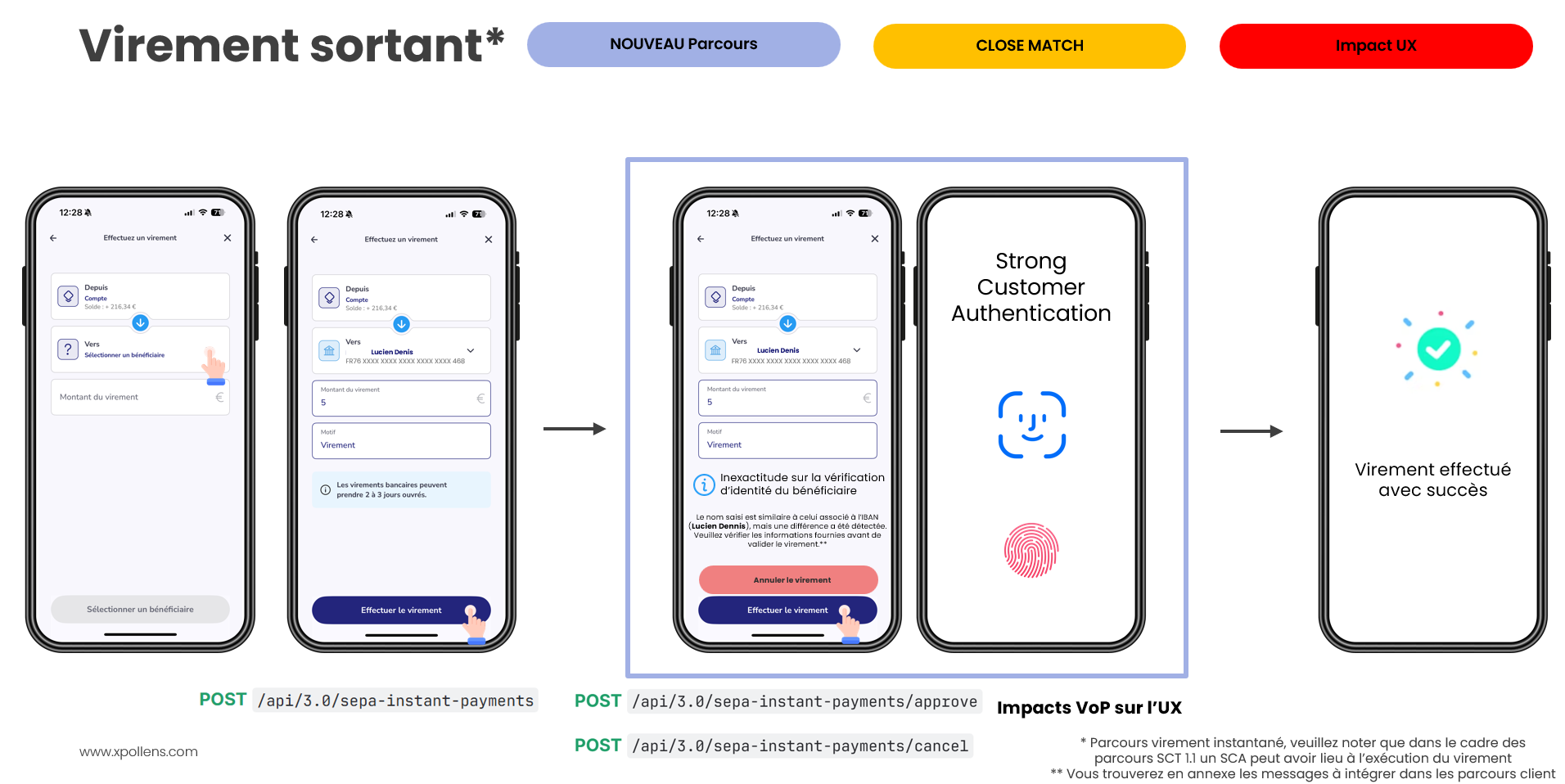
In case of a close match, we recommend suggesting that the end user update the beneficiary’s name to the suggestedName so that future transfers result in a VOP match.
As a reminder, this modification requires SCA validation.
VOP result = No match
VOP result = Verification not possible
VOP on demand
A Verification of Payee (VOP) request can be performed at any time using the POST /v2.0/accounts/accountId/verificationofpayee/request endpoint.
The most common use case is to verify beneficiaries immediately before they are created, improving their reliability and reducing the risk of payment errors.
sequenceDiagram
autoNumber
Actor User
Participant Partner
Participant XPO

Note over User, XPO: Add beneficary
User -->> Partner : Add beneficiary {name}
Partner ->> XPO: POST api/v2.0/accounts/{accountId}/verificationofpayee/request {value = name}
XPO ->> Partner: result


alt Match
rect rgb(219, 255, 230)
	Partner ->> XPO: POST api/sca/v2.0/users/{appUserId}/beneficiary {displayName = name}
end

else CloseMatch
rect rgb(255, 242, 220)
	Partner -->> User: notification: change displayName for suggestedName ?
	User -->> Partner: Yes
	Partner ->> XPO: POST api/sca/v2.0/users/{appUserId}/beneficiary {displayName = suggestedName}
end

else NoMatch
rect rgb(255, 239, 239)
	Partner -->> User: notification: future transfers will need SCA
	User -->> Partner: Ok
  Partner ->> XPO: POST api/sca/v2.0/users/{appUserId}/beneficiary {displayName = name}
end
end
Please note that for all beneficiaries created with a Match result:
- A VOP request will be automatically performed for every SCT or IP.
- The VOP result will always be Match, making the process fully transparent for the end user—no action is required to approve or cancel the transfer.
How to test
Add a beneficiary using one the following name as displayName
| displayName | result | resultDetails | suggestedName |
|---|---|---|---|
| Close Match | CloseMatch | null | Close Macht |
| No Match | NoMatch | null | null |
| Verification NotPossible Timeout | VerificationNotPossible | RespondingPspTimeout | null |
| Verification NotPossible Participant | VerificationNotPossible | RespondingPspNotParticipan | null |
| Verification NotPossible Type | VerificationNotPossible | IdentificationTypeNotSupported | null |
| Verification NotPossible Unreachable | VerificationNotPossible | RespondingPspUnreachable | null |
| Verification NotPossible Error | VerificationNotPossible | VopError | null |
Any other name has a result "Match"
Process an SCT or IP for this beneficiaryId
POST api/v2.0/sepa-credit-transfers
FAQ
Q: In the case of a callback with a failure status during the VOP transfer process:
Even if the verification (name vs IBAN) was successful, the final callback returning a failure makes the overall process invalid.
In this case, should we call the new cancellation endpoint mentioned?
And more generally: in which specific cases should these new cancellation endpoints be used?
A: The new cancellation endpoints must be used when the client no longer wishes to proceed with the transfer.
They allow the operation to be canceled and, in the case of a standard SCT, release the blocked balance (authorization).
The client has 5 minutes after receiving the VoP result to approve or cancel the operation. After this time, the operation is automatically canceled.
Q: Will SCT and IP costs increase following the VoP?
A: Yes, due to the new dedicated infrastructure implemented. We will get back to you shortly with details on the implementation modalities.
Q: No match: if the client decides to proceed with an IBAN entered as "mom," the transfer is approved. Is rejection by the beneficiary bank still possible?
A: Although we have no control over beneficiary banks’ acceptance policies, in theory there should be no rejection
.
Q: If we decide not to cancel the transfer and proceed with the operation, when does the modification of the identity take place?
A: This action is managed by you via the beneficiary update API (field displayName). We will assist you on this topic during the scoping workshops.
Q: Are we obliged to inform the client? Why not just trigger an SCA? (linked to my previous question to avoid complicating the user journey)
A: You are obliged to inform the client. The client alone must decide whether to validate or not the execution of the transfer following a result other than Match (CloseMatch, NoMatch, VerificationNotPossible).
Q: Is it possible to perform VoP immediately when adding the beneficiary?
A: No, this is not possible. VoP is linked to the transfer operation. You must therefore initiate a transfer to obtain the VoP result.
Q: Does the VoP apply to internal accounts?
A: Yes, all outgoing transfers (SCT, IP) are concerned regardless of the type of originating account.
Q: Does the VoP control apply to operations performed from the Partner Space?
A: At launch on October 9, 2025, it will not be available, but it is planned by the end of 2025.
Q: Is there a regulatory obligation to inform the client that validating an operation on an approximate name implies a transfer of responsibility to them?
A: Yes, the client must be informed of the legal impact involved in approving a transfer despite a result other than Match (of any kind).
Q: After the POST, will we receive a callback with a specific status (e.g., approved) during the "wait for approval" phase, or is the operation not yet created on Xpollens’ side?
A: In all cases, the operation is already created. However, for SCT, since the authorization request is made before the VoP call, you will receive two callbacks with status Approved: one after the authorization request and one after the approval of the operation (if applicable). During the WaitingForApproval phase, no callback is sent; the information is included in the API response.
Q: How does the matching algorithm work? Which data is compared?
A: Each beneficiary bank has its own algorithm. These elements are not shared between different actors.
Q: Is it possible to simulate VoP calls and receive the values returned by the beneficiary’s bank for a list of IBANs (Sandbox and Production)?
A: A mock has been set up in the Sandbox environment. It allows deterministic simulation of all use cases that may occur in production. All possible values for each VoP field are also available in our online documentation.
Q: How can we identify a Match response if VoP is not yet integrated?
A: You will be able to infer it upon receiving the Completed callback informing you of the successful execution of the operation. This information (VoP result) will also be available via the Partner Space (by October 9).
Q: What should we display to the client in the case of a "VerificationNotPossible" response?
A: The UX guidelines to integrate will be provided by our teams.
Q: Today, when executing an instant transfer, we wait up to 20s for your response. With VoP, does that mean we must wait for both the VoP response and the XPO response? Won’t this be too long for the user?
A: The maximum VoP response time is 5s. This time is therefore added to the current maximum of 20s.
Q: Why is this control not performed when creating the beneficiary instead of during transfer execution?
A: This is the implementation choice made by the European Payments Council (EPC) for the VoP scheme, in order to meet the requirement for a unitary and systematic check for outgoing transfers (SCT, IP).
Updated 9 months ago